Participant
December 9, 2021
Question

Changing CMYK to spot colors for a "color library" effect

  • December 9, 2021
  • 1 reply
  • 159 views

Hello,


I have some photos that are going to get printed. I'm experimenting with color and I'm trying to replicate the "https://colorlibrary.ch/ " effect. I want to keep the four channels (c m y k), but changing the cyan, magenta... inks with spot colors. It should be simple, but I can't manage to do it.
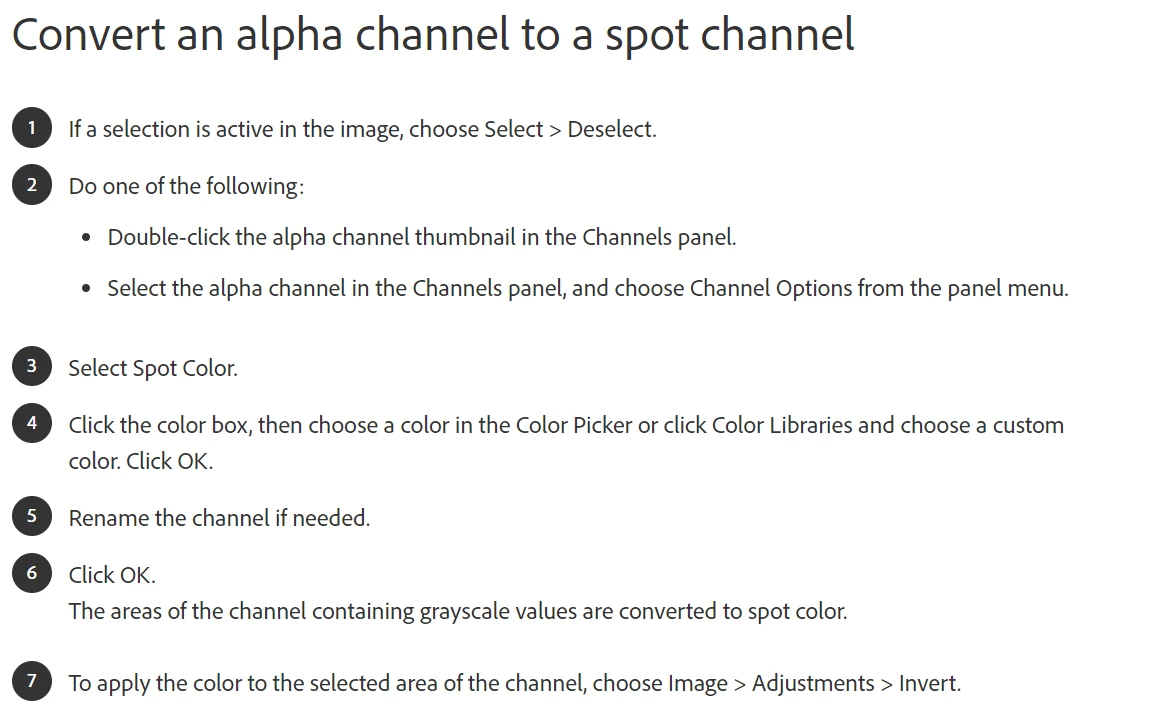
 

This should be the process I'm trying to follow but, when i try to do the second step, "channel options" is grayed out, and I don't know how to continue.


I feel so stupid ahaha, I hope someone is able to help me! Thank you in advance.


This topic has been closed for replies.

1 reply

Stephen Marsh
Community Expert
Community Expert
December 9, 2021

Copy the C & M channels to new alpha channels. Convert the alpha channels to spot channels and set the required Pantone or Lab colour values.


You can then use an adjustment layer to remove the content from the C & M channels (non-destructive) – or simply remove all channel data directly from the C & M channels (destructive).


Keep in mind that the onscreen preview will likely be far from accurate. 


Participant
December 9, 2021

Thank You!!!