
Brandon0McGowan
Participant
November 21, 2018
Answered

Changing images to the same size

  • November 21, 2018
  • 2 replies
  • 426 views

Hello,

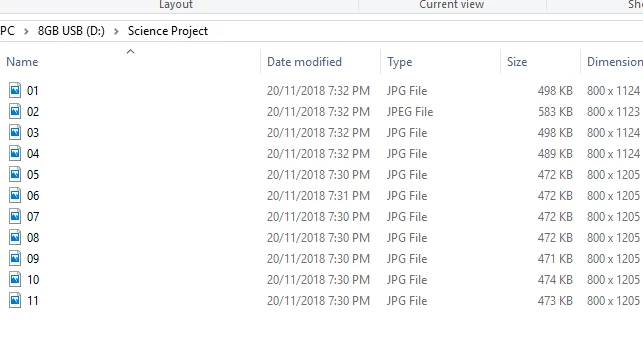
I am trying to change a set of images to the same resolution 7 out of the 11 are the same but there are 4 that i want to change to that size. The problem is if i crop it to the needed size it will cut off most of the important parts. The images are for a power point i am making and i want the maximum size that will work of my slides (800 x 1205). The other images are 800 x 1124 and one is 800 x 1123.
This topic has been closed for replies.
Correct answer gener7

So if understand correctly,, you want 1123 and 1124 expanded to 1205 without changing the 800

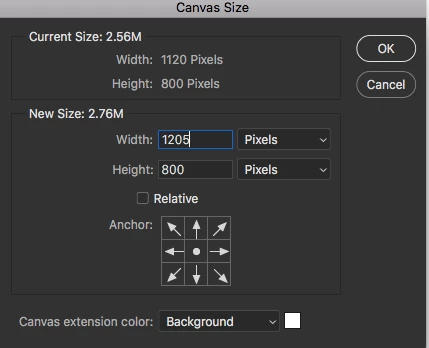
What I can think of is extending the canvas size 81 and 82 pixels lengthwise. It won't stretch your images but just add the extra white space or background color to get it to 1205 pixels.

So Image > Canvas Size will center the image in the new 1205 width and keep the 800 height. See if that works for you.

2 replies

Sebastian Bleak
Community Expert
Community Expert
November 21, 2018

I'd try out the solution that gener7 suggested and you could also do this manually by using the Crop Tool. Just extend it to the desired canvas size

gener7
Community Expert
Community Expert
November 21, 2018

Yeah...I'm being a bit lazy.   You could even make a Crop Tool Preset for 800 x 1250.

gener7
Community Expert
gener7Community ExpertCorrect answer
Community Expert
November 21, 2018

So if understand correctly,, you want 1123 and 1124 expanded to 1205 without changing the 800

What I can think of is extending the canvas size 81 and 82 pixels lengthwise. It won't stretch your images but just add the extra white space or background color to get it to 1205 pixels.

So Image > Canvas Size will center the image in the new 1205 width and keep the 800 height. See if that works for you.