
Known Participant
November 19, 2020
Question

Changing the text in Play part of an Action

  • November 19, 2020
  • 4 replies
  • 327 views

I have an action (Perfect Soft) that I had been using for years. Then the company that made the plugins modified the name of their plugins. So now my action will not work.


They changed Portraiture to Portraiture 3.

They changed Noiseware to Noiseware64.

I have not been able to change the text in the "Run Me" part of the action.


Do I need to record the entire action all over again? I did not make this Perfect soft action. It came from a photographers user group. I have never made an action. I really don't want to start now.
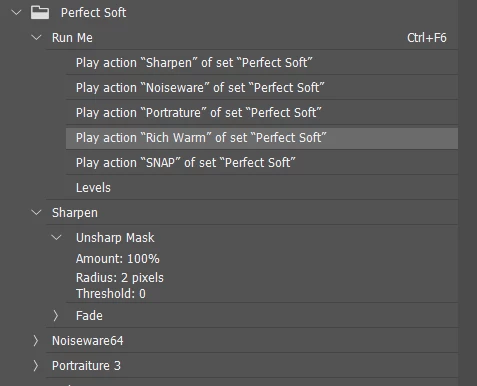
 

Thanks


This topic has been closed for replies.

4 replies

Stephen Marsh
Community Expert
Community Expert
November 20, 2020

Re-recording the affected steps would be simpler/cleaner... Even if you have never made or edited an action before.


Another possibility would be to use an xtools script to save the .ATN as an .XML file, edit the .XML and then use another xtools script to convert the edited/updated .XML back to .ATN:


https://sourceforge.net/projects/ps-scripts/files/xtools/v2.3/


Tom Winkelmann
Inspiring
November 19, 2020

You can also use tools like "ATN Action Translator".


http://www.kyrsoft.com/articles/atn-translator-windows/

Legend
November 19, 2020

Yes you have to re-record those specific steps.

c.pfaffenbichler
Community Expert
Community Expert
November 19, 2020

I suppose you need to amend the affected steps within the Actions (like »Noiseware« (edited) in the Set »Perfect Soft«). 

Actions should not be gard to grasp – expand the Action, look for the affected step and you then can replace that step with a newly recorded one.