
Known Participant
August 25, 2017
Answered

Changing thickness of a line drawn with Line Tool [in PS 2017.1.1]

  • August 25, 2017
  • 2 replies
  • 85342 views

Hi,

I am using Photoshop 2017.1.1 Release.  I have been using the Line Tool to draw line segments.  Sometimes I choose to put an Arrowhead at the Start or End of a line segment.  I have not been using it for very long, but I am pretty sure I remember being able to change the thickness of my line segments by changing the value where I have circled in blue below...
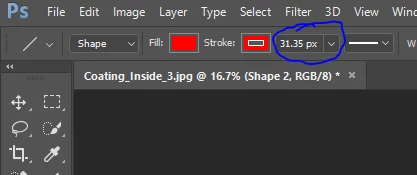
 

... today, changing this value does not seem to have any effect that I can notice.  If anyone can tell me what I am doing wrong, I would greatly appreciate it.


Thanks in advance,
Paul

This topic has been closed for replies.
Correct answer angie_taylor

You need to adjust the line weight value which is further along the control panel to the right :-)

hope this helps :-)

Angie Taylor

2 replies

davescm
Community Expert
Community Expert
August 25, 2017

Hi

The stroke value impacts the width of the stroke around the "line" (shown blue below)

The Weight adjusts the line width (values of 50 and 100 shown below)

Dave

Known Participant
August 25, 2017

Thank you Angie and Dave!  You both gave me correct answers but I could only mark one as the answer.  I really appreciate the help!

Best regards, Paul

angie_taylor
Legend
August 25, 2017

Thanks Paul, happy to help :-)

angie_taylor
angie_taylorCorrect answer
Legend
August 25, 2017

You need to adjust the line weight value which is further along the control panel to the right :-)

hope this helps :-)

Angie Taylor