
Channel to appear as (visible) mask in layer
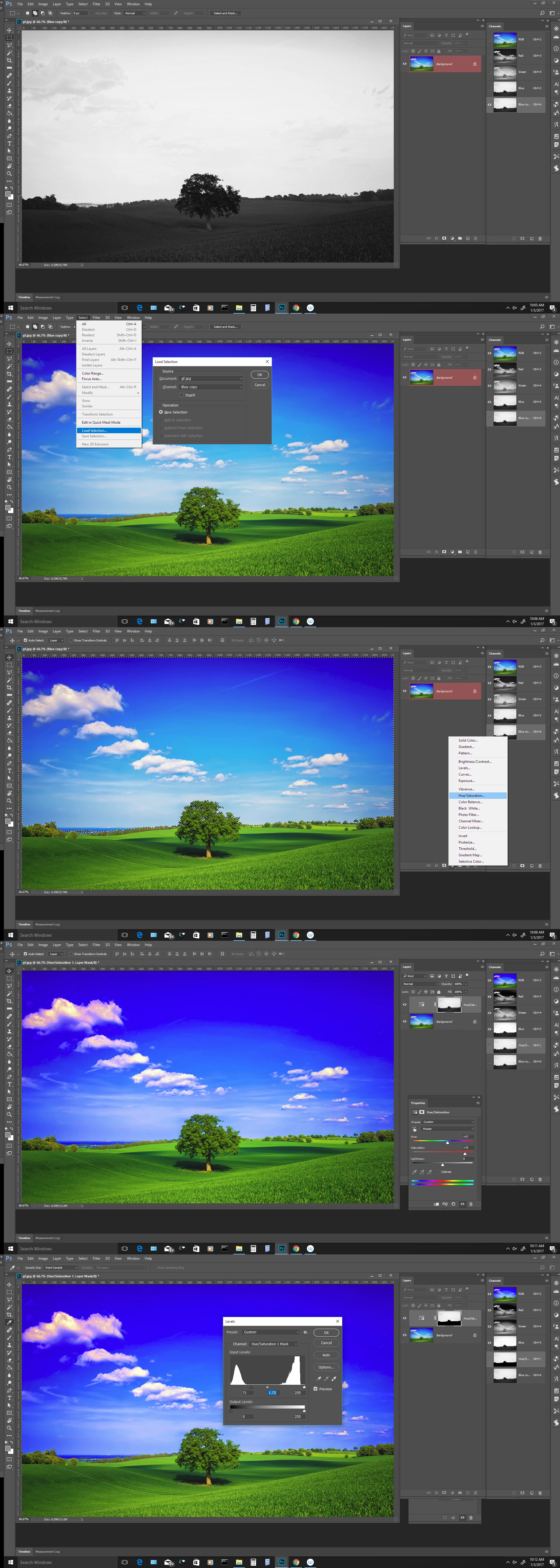
Problem: general: How to get a color channel or other alpha channel to appear as [or in] a visible layer as a regular mask ion the layer panel.
Task at hand, specifically: Simple example: I select the blue channel that I want to use as a regular mask on a copy of my background so that I can manipulate the sky, e.g.: make it more saturated or, more to the case at hand, delete it and replace it*. I can't seem to do the latter with just loading the channel. I would also find it a lot easier to work with the channel mask if it were visible in the layer panel for more direct editing of the image and the mask itself.
*[In reality, I am using a luminosity layer to better select the sky when it is heavily involved with foreground, such as with tree branches and leaves. Just didn't want to complicate this discussion with luminosity mask concepts.]
Bill
 AdChoices