Shine BR
Known Participant
July 4, 2015
Question

Check file informations and respond

  • July 4, 2015
  • 1 reply
  • 248 views

Hello Guys,

Is that possible to check the file informations like images dimension, layer naming, path name, channel if any, and resolution of the file.

And if all the points are matching, the file need to close without save else it need to move into a subfolder named "error".

My requirements are.

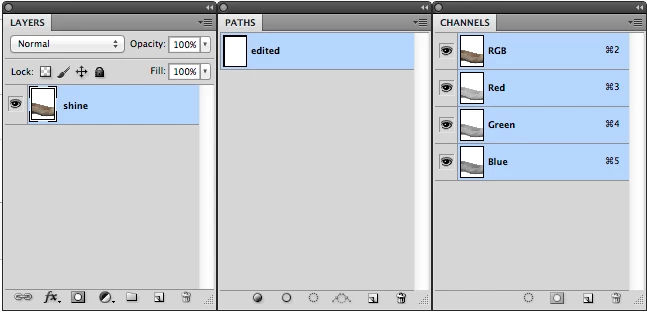
1)Layer name needs to be "shine"

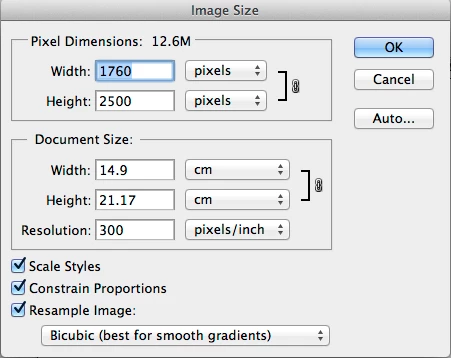
2)Pixel dimension "1760px X 2500px" with 300 dpi.

3)Path name need to be "edited".

4)No channel mask.

I need only to check the file and the script should not edit any thing, if the script see any thing other than the mentioned it just need to move into another sub folder called "error".

I have also shown some snapshot for better understanding.
This topic has been closed for replies.

1 reply

c.pfaffenbichler
Community Expert
Community Expert
July 4, 2015

This should provide some of what you are looking for.

Instead of the alert you can insert whatever operation you want (activeDocument.close() for example) and the check for the Layer name you should be able to figure out yourself.

As for moving a file I am afraid on a Mac the method changePath may not work out and you may have to use copy and remove instead.

// 2015, use it at your own risk;

#target photoshop

if (app.documents.length > 0) {

var check = checkFile ();

if (check == true) {alert ("file checks out")}

else {alert ("file does not check out")}

};

function checkFile () {

var myDocument = app.activeDocument;

var originalRulerUnits = app.preferences.rulerUnits;

app.preferences.rulerUnits = Units.PIXELS;

// check dimensions;

if (myDocument.width == 1760 && myDocument.height == 2500) {}

else {app.preferences.rulerUnits = originalRulerUnits;

return false};

// reset;

app.preferences.rulerUnits = originalRulerUnits;

// check path;

try {myDocument.pathItems.getByName("edited")}

catch (e) {return false};

// check for alpha channels;

for (var m = 0; m < myDocument.channels.length; m++) {

if (myDocument.channels.kind != ChannelType.COMPONENT) {return false}

};

// return true if all requirements are met;

return true

};

edited