
Participant
October 19, 2021
Answered
Choose default color import setting for batch conversion
- October 19, 2021
- 1 reply
- 228 views
Hello community,
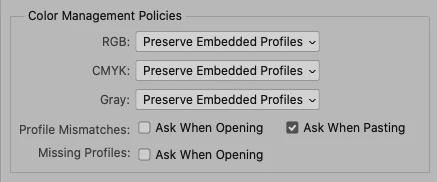
I hope you can help me figure out how to work around the photoshop color setting options, that appear when importing a photo with an embedded color setting. It only presents a challenge, when I want to resize an entire batch of pictures automatically and don't necessarily want to press "use intergrated color profil" for a thousand files.
I've tried recording the selection into the action I've created for the resizing process without any luck.
Is there a way to choose a default setting for color settings? Or other options I haven't thought of?
Hope some of you can help 🙂
 AdChoices