

Tomas Sinkunas
Legend
September 7, 2017
Question

Clean SL

  • September 7, 2017
  • 11 replies
  • 23518 views

Hello gang!

I just wanted to share with you my small utility tool for Photoshop called Clean SL that cleans ScriptingListenerJS.log file to make it more readable.

Recently watched Davide_Barranca​'s Adobe Photoshop HTML Panels Development course  and realised how painful it is to work with Action Manager's code and how unreadable it is right off the box. I know there are quite a few other tools that cleans log file, however it doesn't hurt to have an option to choose.

Interested? Grab it here: rendertom / Clean SL / source / — Bitbucket
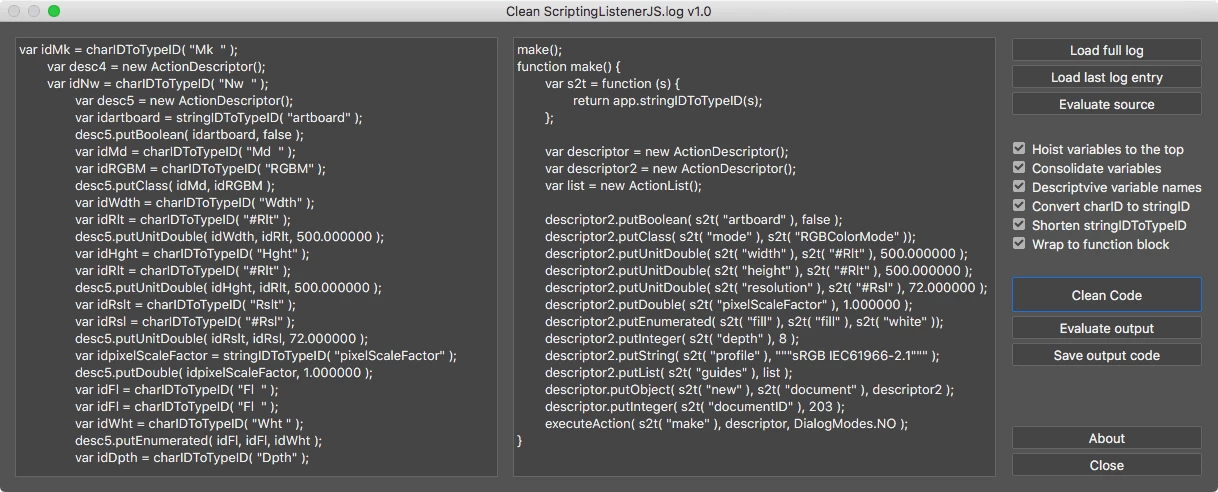
Script performs multiple actions such as cleaning-up variable names and hoisting them to the top, wraps code block into function, converts charID to string ID for better readability and such. Resulting code is clean and maintains better readability.

Features:

  • Load entire ScriptingListenerJS.log content
  • Load only last entry in ScriptingListenerJS.log
  • Enter ScriptingListenerJS code manually

Options:

  • Hoist variable declaration to the top
  • Consolidate variables
  • Give descriptive variable names
  • Convert charID to stringID for better readability
  • Replace stringIDToTypeID() to s2t() function
  • Wrap to function block.

Example:

From this:

var idHStr = charIDToTypeID( "HStr" );

    var desc21 = new ActionDescriptor();

    var idpresetKind = stringIDToTypeID( "presetKind" );

    var idpresetKindType = stringIDToTypeID( "presetKindType" );

    var idpresetKindCustom = stringIDToTypeID( "presetKindCustom" );

    desc21.putEnumerated( idpresetKind, idpresetKindType, idpresetKindCustom );

    var idClrz = charIDToTypeID( "Clrz" );

    desc21.putBoolean( idClrz, false );

    var idAdjs = charIDToTypeID( "Adjs" );

        var list1 = new ActionList();

            var desc22 = new ActionDescriptor();

            var idH = charIDToTypeID( "H   " );

            desc22.putInteger( idH, 39 );

            var idStrt = charIDToTypeID( "Strt" );

            desc22.putInteger( idStrt, 23 );

            var idLght = charIDToTypeID( "Lght" );

            desc22.putInteger( idLght, -27 );

        var idHsttwo = charIDToTypeID( "Hst2" );

        list1.putObject( idHsttwo, desc22 );

    desc21.putList( idAdjs, list1 );

executeAction( idHStr, desc21, DialogModes.NO );

to this:

hueSaturation();

function hueSaturation() {

    var s2t = function (s) {

        return app.stringIDToTypeID(s);

    };

    var descriptor = new ActionDescriptor();

    var list = new ActionList();

    var descriptor2 = new ActionDescriptor();

    descriptor.putEnumerated( s2t( "presetKind" ), s2t( "presetKindType" ), s2t( "presetKindCustom" ));

    descriptor.putBoolean( s2t( "colorize" ), false );

    descriptor2.putInteger( s2t( "hue" ), 39 );

    descriptor2.putInteger( s2t( "saturation" ), 23 );

    descriptor2.putInteger( s2t( "lightness" ), -27 );

    list.putObject( s2t( "hueSatAdjustmentV2" ), descriptor2 );

    descriptor.putList( s2t( "adjustment" ), list );

    executeAction( s2t( "hueSaturation" ), descriptor, DialogModes.NO );

}

Installation

Clone or download repository and place Clean SJ.jsx script to Photoshop’s Scripts folder:

Adobe Photoshop CC 20XX -> Presets -> Scripts -> Clean JS.jsx

Restart Photoshop to access Clean JS script from File -> Scripts

------------------------------------------------

Since I am rather new to Photoshop Scripting, I might have missed something of my code brakes. So if you find any bugs or issues, please do not hesitate to let me know so I could fix it.

So, happy cleaning everybody!

This topic has been closed for replies.

11 replies

JJMack
Community Expert
Community Expert
September 7, 2017

I downloaded it and it look very interesting.  It work somewhat but I have big problems with it.  I control the script listener log with a bat file so I can know what is in the log. If did a simple test.  I cleared the log. I the use the new file new interface to created a new document added a shape layer then add a layer style toe the shape layer.  I then lock the log by changing it to read only.  I look at the log a saw some junk action manager steps then saw the make document make shape and add layer style.

I then started up Clean SL.  It display the make document source code. Not any of the junk steps. I could evaluate the source clean the source and evaluate the clean source.

I the loaded the  full log. the UI showed all the steps in the log including the first few unknown steps.  Cloud not evaluate the source. Through and error. So I unlocked the log and deleted  the few junk steps saved the log and locked it. 

Clean SL could then evaluate the source  and clean the source but when I evaluated the cleaned output a new document was not created and the shape layer was added the the document create evaluating the source. The layer style was also added.

When I close Clean SL and close the document and started Clean SL load the log and cleaned the source when I tried the evaluate the cleaned code the was an error.

JJMack
Tomas Sinkunas
Legend
September 7, 2017

JJMack Sorry, I have trouble understanding you, maybe because English is not our native language ...

Do you mind providing Action Managers code, so I could test?

Also, I didn't think one would use Clean SL to clean entire log file and try to execute it. However, this would be possible. I would have to increment function names as well, because if you took a look at Clean SL code, it creates function make() few times. This might be the issue for your problem.

If you provided source code, I could look into that.

Thank you.

smithcgl9043167
Inspiring
September 7, 2017

Before:

var idsave = charIDToTypeID( "save" );

    var desc8 = new ActionDescriptor();

    var idAs = charIDToTypeID( "As  " );

        var desc9 = new ActionDescriptor();

        var idPGIT = charIDToTypeID( "PGIT" );

        var idPGIT = charIDToTypeID( "PGIT" );

        var idPGIN = charIDToTypeID( "PGIN" );

        desc9.putEnumerated( idPGIT, idPGIT, idPGIN );

        var idPNGf = charIDToTypeID( "PNGf" );

        var idPNGf = charIDToTypeID( "PNGf" );

        var idPGAd = charIDToTypeID( "PGAd" );

        desc9.putEnumerated( idPNGf, idPNGf, idPGAd );

        var idCmpr = charIDToTypeID( "Cmpr" );

        desc9.putInteger( idCmpr, 9 );

    var idPNGF = charIDToTypeID( "PNGF" );

    desc8.putObject( idAs, idPNGF, desc9 );

    var idIn = charIDToTypeID( "In  " );

    desc8.putPath( idIn, new File( "C:\\Users\\Eu\\Desktop\\Img.png" ) );

    var idDocI = charIDToTypeID( "DocI" );

    desc8.putInteger( idDocI, 279 );

    var idsaveStage = stringIDToTypeID( "saveStage" );

    var idsaveStageType = stringIDToTypeID( "saveStageType" );

    var idsaveSucceeded = stringIDToTypeID( "saveSucceeded" );

    desc8.putEnumerated( idsaveStage, idsaveStageType, idsaveSucceeded );

executeAction( idsave, desc8, DialogModes.NO );

After

save();

function save() {

    var s2t = function(s) {

        return app.stringIDToTypeID(s);

    };

    var descriptor = new ActionDescriptor();

    var descriptor2 = new ActionDescriptor();

    descriptor2.putEnumerated(s2t("PNGInterlaceType"), s2t("PNGInterlaceType"), s2t("PNGInterlaceNone"));

    descriptor2.putEnumerated(s2t("PNGFilter"), s2t("PNGFilter"), s2t("PNGFilterAdaptive"));

    descriptor2.putInteger(s2t("compression"), 9);

    descriptor.putObject(s2t("as"), s2t("PNGFormat"), descriptor2);

    descriptor.putPath(s2t("in"), new File("C:\\Users\\Eu\\Desktop\\Img.png"));

    descriptor.putInteger(s2t("documentID"), 279);

    descriptor.putEnumerated(s2t("saveStage"), s2t("saveStageType"), s2t("saveSucceeded"));

    executeAction(s2t("save"), descriptor, DialogModes.NO);

}

Very good! Congratulations on the script, nice work.

Tomas Sinkunas,thanks for sharing.