

Inspiring
August 30, 2018
Answered

Click Image size resample and goes to inches

  • August 30, 2018
  • 2 replies
  • 917 views

I Click Image size re sample and goes to inches from pixels, why? Is this new PS behavior? I don't remember that in the past.  (and pixels is then greyed out)

    This topic has been closed for replies.
    Correct answer Barb Binder

    THANKS Barb, is this link icon new in PS? I don't remember it. I remember that I was forced.. that if put one number in always affected the other.


    There was always a link icon—but it was on the other side before Adobe redesigned the dialog box to include a preview. Here is a CS6 screenshot. What version did you upgrade from?
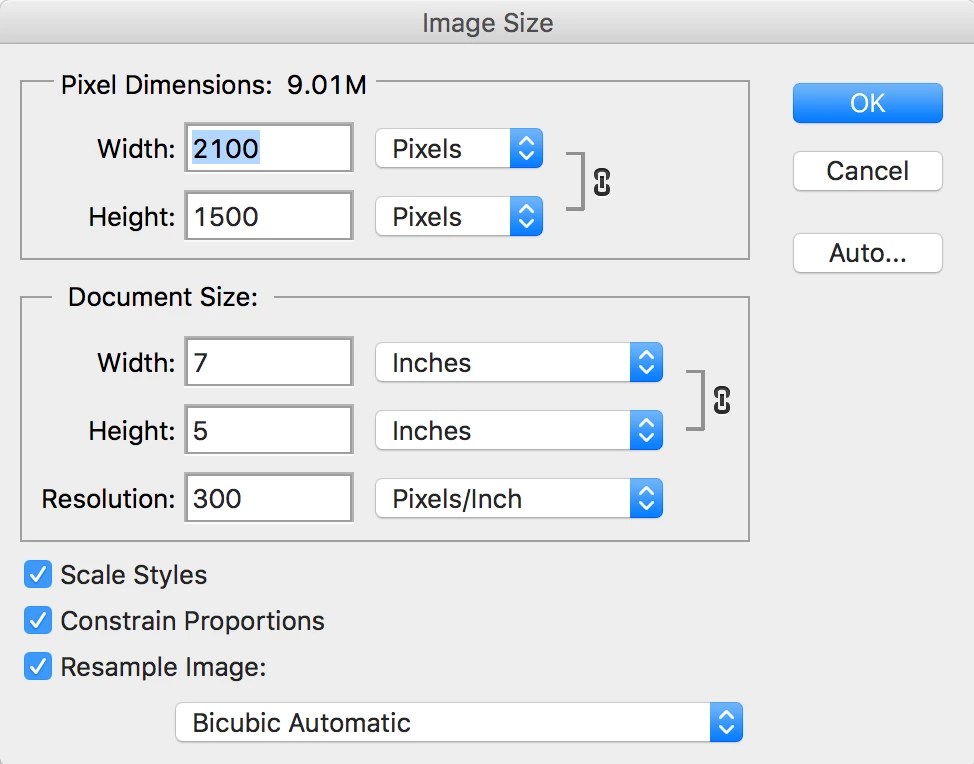
    ~Barb

    2 replies

    Bojan Živković11378569
    Community Expert
    Community Expert
    August 30, 2018

    If you uncheck Resample that is normal behavior, nothing new. With Resample turned off you can not change pixels on the image,  the image will remain the same with the exact same number of pixels. What you can change is physical or print dimensions which depends on how many pixels will be distributed on an inch, millimeter...

    larry45Author
    Inspiring
    August 30, 2018

    thanks Bojah, still lost. Have an image 2800 x  85 pixels, 300 res. I want to get the height to 120 pixels, I cannot seem to accomplish this.

    Barb Binder
    Community Expert
    Community Expert
    August 30, 2018

    Hi Larry:

    If you want to increase the height of the image from 85 px to 120 px, turn resample on and pick your resample algorithm. The width will increase proportionally, unless you click the link icon connecting the width and height values.

    ~Barb

    ~Barb at Rocky Mountain Training
    Trevor.Dennis
    Community Expert
    Community Expert
    August 30, 2018

    AFAIK there is no Preference setting for this, and it just remembers the last unit used.   Changing the units via the rulers  does not make any difference for instance.