
Click-to-zoom not zooming in where I click
Hello,
I'm having this issue with zooming in that's been going on for the past month at least, which started in the Photoshop CC 2019 for me and is still going on in the 2020 version.
After I've rotated my canvas using the "rotation view" tool and then click on a spot where I want to zoom in, it usually starts zooming in elsewhere than where I want it to. Sometimes, zooming in works fine at angles like -109°, but most of the time Photoshop instead focuses on a spot away from the cursor (if that makes sense), close to canvas edges or outside of canvas (same thing happens when you click-and-drag to mark an area where you want to zoom in).
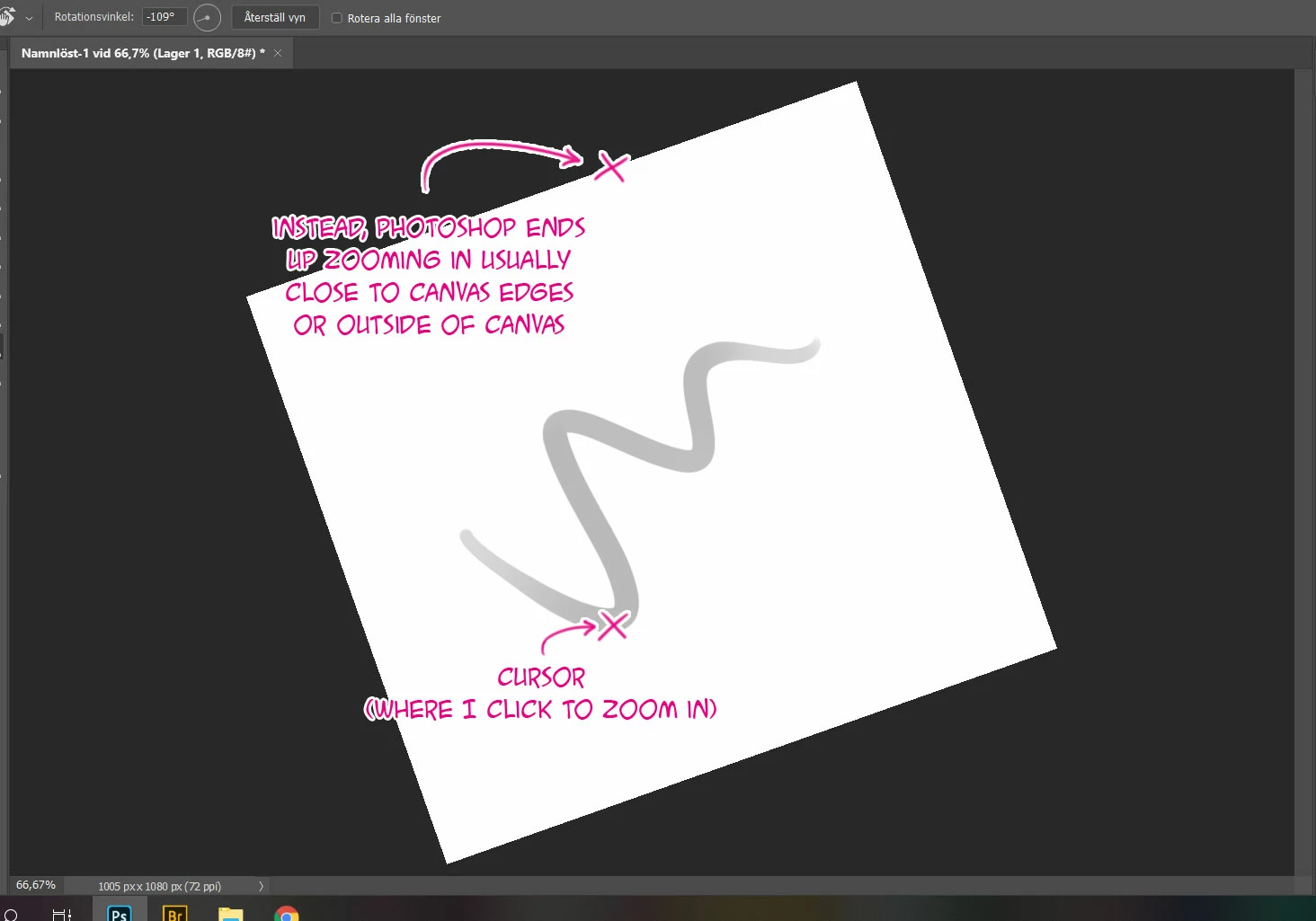
I've reset my Photoshop preferences to default, but that didn't solve the issue. However, the zoom works fine as long as I haven't rotated the canvas before I click to zoom in, or when I scroll to zoom in instead.
I also disabled "overscroll", but that didn't help either. I was hoping the bug would go away on it's own after Windows or Photoshop went through another update, but sadly that wasn't the case.
I'm using:
Adobe Photoshop CC 2020 (though,
Windows 10
Processor Intel(R) Core(TM) i7-8750H CPU
Asus TUF Gaming Laptop
 AdChoices