
Participant
April 6, 2017
Answered

Clipping mask over brush layer

  • April 6, 2017
  • 1 reply
  • 705 views

Hi all and anyone!

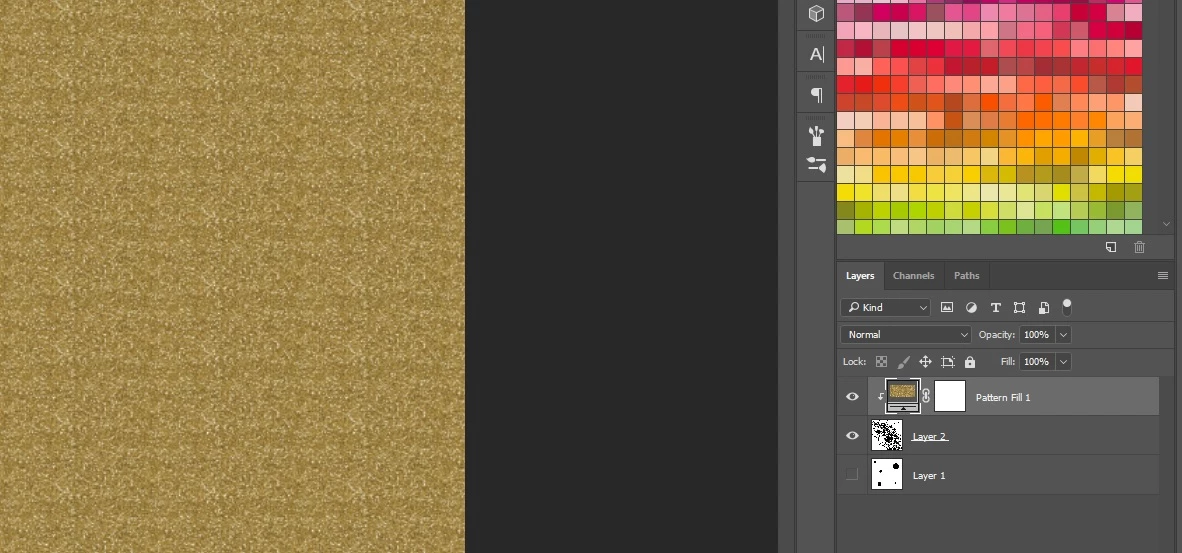
I am using a PC and have PSCC 2017. I am new to PS so please forgive my noob behaviour! I have created a confetti brush and applied this to a layer and then completed the following route to apply a clipping mask:

- new layer

- new fill layer

- pattern

- chosen glitter pattern

- right click, create clipping mask to this layer

Nothing has happened, I can just see the glitter layer.

Please help if you can and see my image if that helps!

Thank you in advance.
This topic has been closed for replies.
Correct answer davescm

A clipping mask will show the top layer where there are solid pixels on the layer below and will be transparent where there are no pixels.

It is hard to tell from your screenshot but the layer below appears to consist of all black or white pixels, but no transparency?  If that is the case , the top (clipped) layer will also show as solid.

In other words layer 2 needs to consist of transparent and solid areas (as opposed to black & white)

Dave

1 reply

davescm
Community Expert
davescmCommunity ExpertCorrect answer
Community Expert
April 6, 2017

A clipping mask will show the top layer where there are solid pixels on the layer below and will be transparent where there are no pixels.

It is hard to tell from your screenshot but the layer below appears to consist of all black or white pixels, but no transparency?  If that is the case , the top (clipped) layer will also show as solid.

In other words layer 2 needs to consist of transparent and solid areas (as opposed to black & white)

Dave