Participant
May 7, 2017
Answered

Clipping Path - inverted

  • May 7, 2017
  • 2 replies
  • 4658 views

I am working in Photshop CS6. I have a grayscale photo of a hand - I drew the outer edge of the hand path - Made the path a clipping path - w/ Flatness: 1 device pixels - Save the file as .psd - When I place in InDesign - the background is WHITE, & the hand is CLEAR - I want the background to be CLEAR.

- JimK
    This topic has been closed for replies.
    Correct answer D.A.R

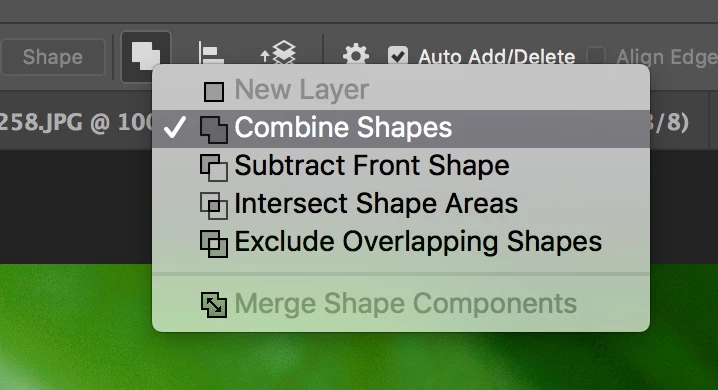
    When you draw the path be sure the options are such:

    You can change those options at any time while drawing the path or by selecting the path afterwards and changing the option.

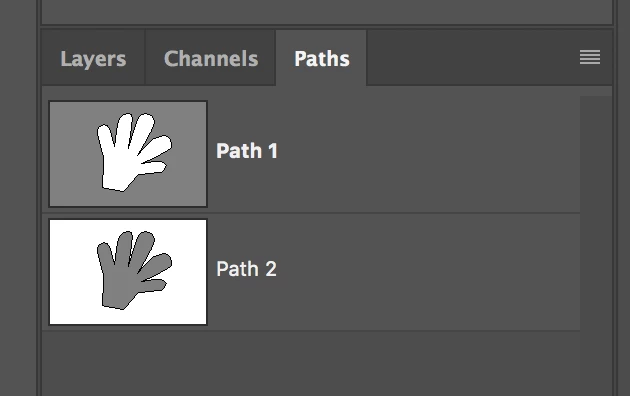
    Either way your paths panel should look like this where path 1 is the correct orientation.

    2 replies

    D.A.R
    D.A.RCorrect answer
    Legend
    May 8, 2017

    When you draw the path be sure the options are such:

    You can change those options at any time while drawing the path or by selecting the path afterwards and changing the option.

    Either way your paths panel should look like this where path 1 is the correct orientation.

    barbara_a7746676
    Community Expert
    Community Expert
    May 7, 2017

    I can't replicate this problem. In InDesign, make sure that Object > Clipping Path > Options does not have Invert turned on. Or if is not on, and the problem persists, there may be a problem with the clipping path in Photoshop.