
DAECI
Participant
December 15, 2016
Answered

Clone Stamp/Healing Brush show overlay option acting weird!

  • December 15, 2016
  • 3 replies
  • 2411 views

I've just switched to PS 2017 and am having trouble with the "show overlay" option. In older versions, you'd select an area and it would display it inside the brush for exact placement. But now when I select an area and move the brush around, it drags the entire layer around. Is this a bug or did they modify it to do that? If it's the latter then I have no clue how this is supposed to work! Any input would be greatly appreciated!
    This topic has been closed for replies.
    Correct answer Trevor.Dennis

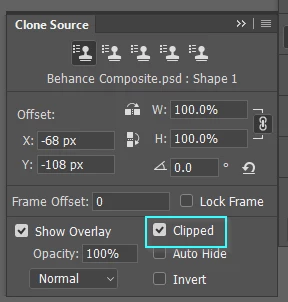
    You can usually fix all issues like that by resetting the tool (left end of Options Bar), or you could check your Clone Source panel and see if ​Clipped​ has become un checked.

    3 replies

    DAECI
    DAECIAuthor
    Participant
    December 15, 2016

    And vualá! lol

    Thanks to you both!

    davescm
    Community Expert
    Community Expert
    December 15, 2016

    Go to the Clone Source panel and click at the top right to get options. Then check "clip to brush tip".

    Dave

    Participant
    September 1, 2020

    Never mind.  I am in the wrong chat!  Next question, how can I simply delete a question when I realize I am in the wrong place??


    Trevor.Dennis
    Community Expert
    Trevor.DennisCommunity ExpertCorrect answer
    Community Expert
    December 15, 2016

    You can usually fix all issues like that by resetting the tool (left end of Options Bar), or you could check your Clone Source panel and see if ​Clipped​ has become un checked.

    davescm
    Community Expert
    Community Expert
    December 15, 2016

    Trevor beat me to it

    Dave

    Trevor.Dennis
    Community Expert
    Community Expert
    December 15, 2016

    davescm wrote:

    Trevor beat me to it

    Dave

    Which is just a wee bit scary, as it puts me 10 points off an unlucky thirteen thousand.  If I get one more answer right, I'm in for a very unlucky day!