
garryg70673208
Inspiring
February 27, 2022
Answered

Clone Stamp offset incorrectly with "Override High DPI Scaling Behavior" enabled

  • February 27, 2022
  • 6 replies
  • 825 views

I am on release 23.2.1 and have an i9 setup with 64Gb of RAM.

I've spent two days confirming the 'bug', which manifests itself on a 4K monior, I have an ASUS PA279CV.

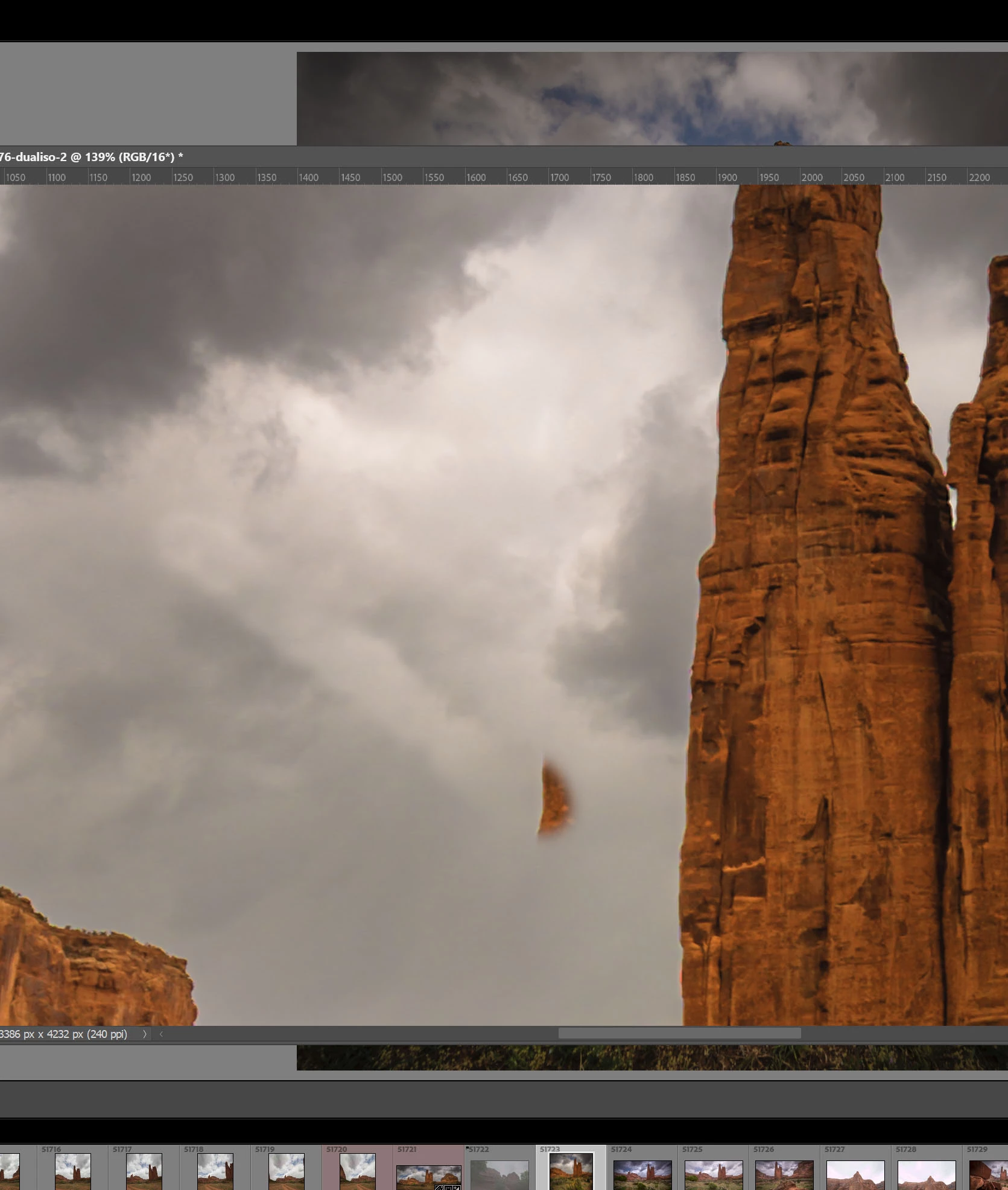
The attached image shows the bug.

If I run Ps on the 4K monitor or run Ps on the standard Monior and duplicate the image to the 4K monior and try and clone stamp on the 4K, I get the bug.

After selecting the clone source point, the cloning jump to the left and up and starts cloning from there. As you can see, rather than cloning the side of the rock I selected, the clone point jumped up and left and started cloning from there.

All is OK on my 2K monior: everytime. All is broken on my 4K, everytime.

This needs fixing, like all the other stuff that needs fixing in Ps 😉
This topic has been closed for replies.
Correct answer J453

This is my best guess as to the root of your problem: https://helpx.adobe.com/photoshop/kb/high-dpi-scaling.html


6 replies

garryg70673208
Inspiring
March 14, 2022

Jeffrey


That fixed it 🙂


Many thanks for your suport.


Cheers


Garry

J453Correct answer
Legend
March 14, 2022

This is my best guess as to the root of your problem: https://helpx.adobe.com/photoshop/kb/high-dpi-scaling.html


Participant
August 3, 2022

Hi Jeffrey! I wonder if you could help me too. I have the same problem, but this solution do not worked. I dont know what could i try next. Here i wrote all the issue i have with a video to show :
My problem posted here


garryg70673208
Inspiring
March 1, 2022

Another day testing, but just confirming the 'bug'.

On a 4K monitor, with 100% scaling things seem OK.

Put scaling to 150% and you get the attached when using the clone stamp tool.

As you can see, I selected in the corner and repositioned to the new the put I which to clone too, but you get the observed streak.

garryg70673208
Inspiring
February 28, 2022

I find it strange I'm the only one seeing this 'bug'. 

As I say, if I set the OS win11 scaling to 100% things work ok, but the menus are too small. 
If you set the scaling to the recommend 150% you see the clone stamp etc playing up, as shown in the image above. 

garryg70673208
Inspiring
February 27, 2022

Jeffrey


I have three monitors running, ie one 4K and two normal res. 
I have tried a single 4K set up, ie no other monitors connected. 
The 'bug' continues to show, ie the clone stamp and healing brush exhibit the bug. 
Cheers

Garry

Legend
February 27, 2022

Are you using both monitors at the same time? If you relaunch Photoshop on the 4K monitor, does it work correctly?