
Participating Frequently
June 12, 2017
Answered

Clone stamp or spot healing brush tool will not work?

  • June 12, 2017
  • 2 replies
  • 2322 views

Hi,

I'm not too far advanced in Photoshop, but I have been using the clone stamp and the spot healing brush to do a lot of restoration on scanned photos. Both have been working great until yesterday and they both stopped working. Then today I updated the Photoshop CC and still no luck. I tried the suggestion under the "clone stamp not working" help and none work. Can someone help me? The clone stamp does everything it supposes to but not stamp.
    This topic has been closed for replies.
    Correct answer mark@headTrix

    NO... that is not the reason. But good thinking!

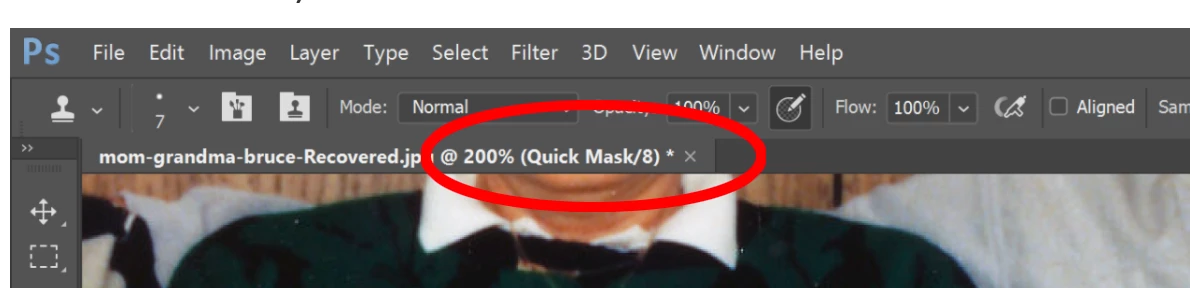
    Its because you have QUICK MASK on!! Just press the letter "Q" the toggle Quick Mask off and On!

    You can tell it is on from the TOP of your document!

    Hope that helps!

    mark

    headTrix, Inc. | Adobe Certified Training & Consulting
    310.450.0122 | info@headTrix.com

    www.headTrixTraining.com

    Consulting | Design | Development | Training

    2 replies

    Vishu_Aggarwal
    Participating Frequently
    June 13, 2017

    Check the settings in the clone Source panel by going to Window menu > Clone Source.

    Default settings look as follow -

    Vishu AggarwalAdobe Certified Instructor, Professional and Expert
    Participating Frequently
    June 13, 2017

    Thank you

    Mohammad.Harb
    Community Expert
    Community Expert
    June 12, 2017

    Reset the Tool from the Option bar,

    if that does not work, please Post a screenshot showing  Layers and Option Bar

    Participating Frequently
    June 13, 2017

    Here's the screenshot you wanted.