
Inspiring
September 12, 2017
Answered

Clone stamp shows 'negative' of sampled area inside the tool

  • September 12, 2017
  • 1 reply
  • 4125 views

Only recently I have noticed that the clone stamp tool's behaviour seems to have changed, because the cloned area now appears to display a negative or inverted colour version of the sampled area, whereas it just used to show the sampled pixels. Choose an opacity of, say, 30% and, as the stamp is applied by left-clicking, it clones pixels from the sample area OK but, as the cloning builds up, the interior of the tool gradually darkens, so you can't really see what you're doing.

In the example below I've got a tool of 175px with a hardness of 30% and I Alt-clicked the target on the house's doorway. The screen shot shows the tool's appearance, which looks like a negative of the sampled area.

Is this behaving correctly, or has there been a change to Photoshop, or do I perhaps have a graphics driver problem?

Any assistance would be greatly appreciated, thanks.
This topic has been closed for replies.
Correct answer Jeff Arola

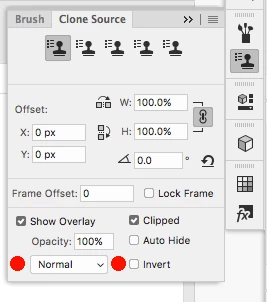
Go to Window>Clone Source and make sure Normal is the blend mode and Invert is not checked.

1 reply

Inspiring
September 12, 2017

This second screenshot shows the same image after applying the stamp six or seven times, then moving the tool upwards, away from the cloned area.  Cloning has taken place properly but the tool still shows a negative image of the sampled area and if it's moved over the cloned area it darkens and obscures the previous cloning.

Jeff Arola
Community Expert
Jeff ArolaCommunity ExpertCorrect answer
Community Expert
September 12, 2017

Go to Window>Clone Source and make sure Normal is the blend mode and Invert is not checked.

Inspiring
September 13, 2017

Thanks very much, Jeff.

I thought it had to be something simple like that but hadn't noticed that blend mode was set to Difference.

Doh!