Inspiring
December 16, 2017
Answered

Clone Stamp Tool Brush Options

  • December 16, 2017
  • 2 replies
  • 5832 views

In previous versions of Photoshop I have been able to use any brush type with the Clone Stamp Tool.

In Photoshop CC 2018 the only brush option seems to be a round brush with variables of size and softness.  When I try and select another brush it takes me to another tool (eg the standard brush tool for painting)

Is there a way to use any brush type with the Clone Stamp Tool?
    This topic has been closed for replies.
    Correct answer davescm

    Hi

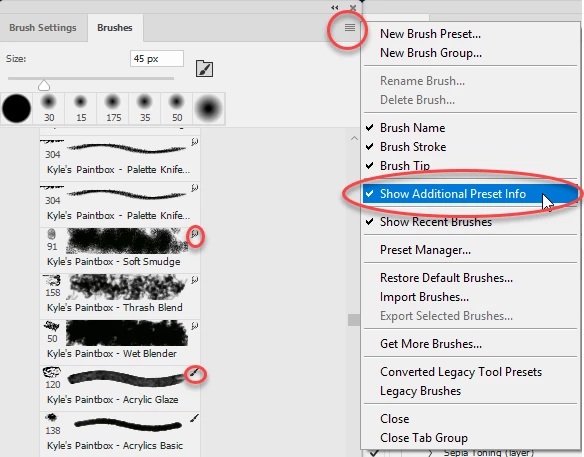
    Yes you can. However some brushes are saved with an associated tool settings so when selected they switch to that tool. You can see which ones by turning on "Show Additional Preset Info" in the brushes panel. The tool is then shown at the top right of the brush.

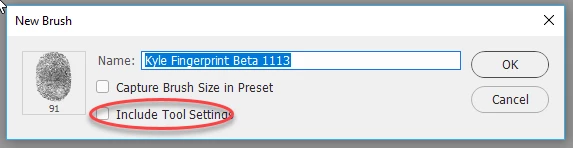
    To save a copy of a brush without the tool preset then with the brush selected, choose New Brush Preset, from the menu above, and in the dialogue uncheck "Include Tool Settings"

    You will now have the same brush available to use with any tool

    Dave

    2 replies

    Participant
    May 30, 2024

    I had the same question. It's ridicolous how they made something that was simle - and good, into somethig so complicated. 

    davescm
    Community Expert
    davescmCommunity ExpertCorrect answer
    Community Expert
    December 16, 2017

    Hi

    Yes you can. However some brushes are saved with an associated tool settings so when selected they switch to that tool. You can see which ones by turning on "Show Additional Preset Info" in the brushes panel. The tool is then shown at the top right of the brush.

    To save a copy of a brush without the tool preset then with the brush selected, choose New Brush Preset, from the menu above, and in the dialogue uncheck "Include Tool Settings"

    You will now have the same brush available to use with any tool

    Dave

    Inspiring
    February 8, 2022

    That is too much work. I did learn from Dave about the tool preset, but the fastest work around is simply to go further down the list into the Legacy brushes, which don't appear to have associated presets.


    This is another small example of Adobe fixing something that was not broken.