
Participant
June 29, 2017
Answered

Clone Stamp Tool. How to change an option "Current & Below" to "Current" and backward by using hot keys ?

  • June 29, 2017
  • 4 replies
  • 1187 views

Is it possible in Clone Stamp Tool and in Healing Brush Tool change an option "Current & Below" to "Current" and backward by using hot keys ?
    This topic has been closed for replies.
    Correct answer davescm

    Hi

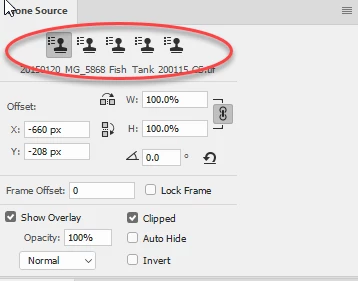
    You can't do that directly but you could set up the sampling for each of the clone sources separately in the clone source panel

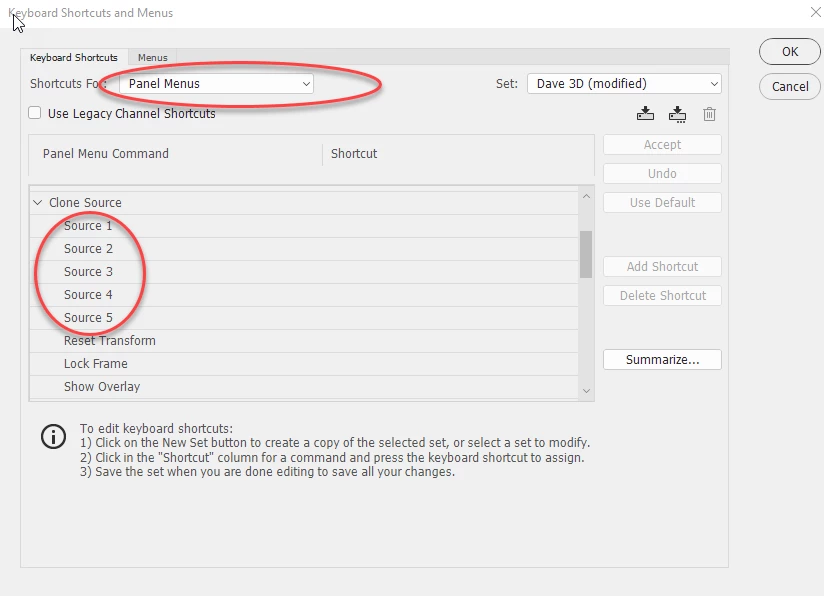
    Then assign a key to each in Keyboard Shortcuts:

    Dave

    4 replies

    Earth Oliver
    Legend
    January 28, 2022

    No possible, unfortunately.
    Which reminds me that we've been waiting a decade now for Adobe to fix the option-double-tap Aligned bug (or is that a feature?).

    Participant
    January 28, 2022

    It is possible. Read my reply 😉

    The script works like a charm and I assigned a hot key to it.

    Participant
    January 28, 2022

    There is also another solution using a script. It is explained here and works perfectly for me.


    https://community.adobe.com/t5/photoshop-ecosystem-discussions/switching-sample-layers-with-shortcut-key-for-clone-and-heal-tool/m-p/10975502

    c.pfaffenbichler
    Community Expert
    Community Expert
    June 29, 2017

    If I remember correctly that would need Tool Presets, the selection of which can be assigned shortcuts via Actions.

    Unfortunately that also affects other settings, like radius etc.

    Edit: Maybe a Scripting solution would also be an option …

    davescm
    Community Expert
    davescmCommunity ExpertCorrect answer
    Community Expert
    June 29, 2017

    Hi

    You can't do that directly but you could set up the sampling for each of the clone sources separately in the clone source panel

    Then assign a key to each in Keyboard Shortcuts:

    Dave