
Stellar_navigator0D45
Participating Frequently
January 22, 2019
Answered

clone stamp tool looks weird

  • January 22, 2019
  • 1 reply
  • 785 views

Why my clone stamp looks like this? How can I fix it? Its with soft brush 0% hardness. And when I tried to set the source for it with alt I accidently tapped shift and the cursor changed. What does shift do? Thanks
    This topic has been closed for replies.
    Correct answer Sahil.Chawla

    Hi there,

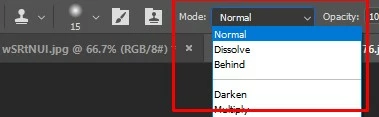
    I believe the Clone tool is behaving this way is because of the Mode of the tool is set to Dissolve, try changing it to Normal and see if it helps.

    Regards,
    Sahil

    1 reply

    Sahil.Chawla
    Adobe Employee
    Sahil.ChawlaCorrect answer
    Adobe Employee
    January 22, 2019

    Hi there,

    I believe the Clone tool is behaving this way is because of the Mode of the tool is set to Dissolve, try changing it to Normal and see if it helps.

    Regards,
    Sahil