
fk64121224
Participating Frequently
March 30, 2018
Answered

clone (text) selection with alias preserve

  • March 30, 2018
  • 1 reply
  • 381 views

Hi,

I've some text made with text-tool option "sharp" ... that results in text with some Anti-aliasing.

That text I want to fill with clone stamp and preserve Anti-aliasing for smooth edges.

What I do now:

1) click on darkest color of text with Magic Wand

2) fill with clone that selection ... result: Anti-aliasing effect of original text is lost.

Question:

Is there a solution to fill text-shape with some clone-information and preserve original edges of text (I mean the Anti-alias-effect)
This topic has been closed for replies.
Correct answer davescm

I would approach this differently

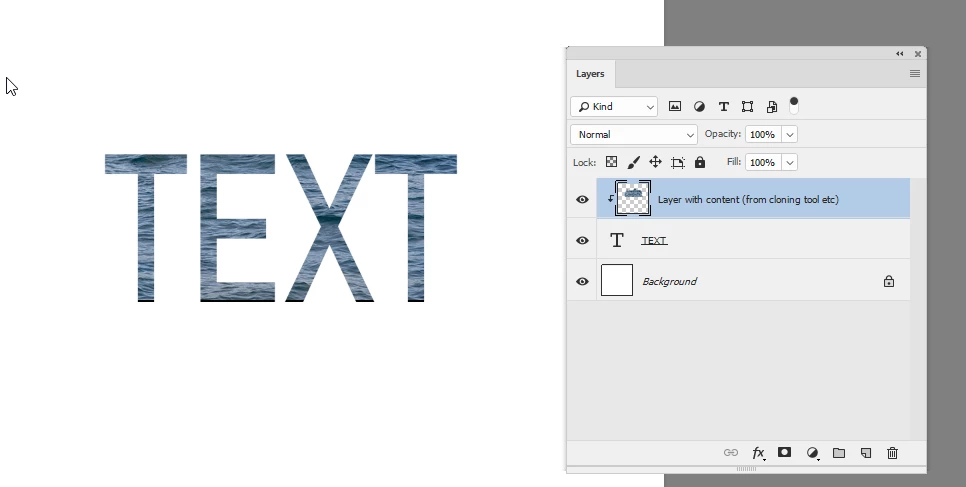
1.Make your text layer (don't convert it to pixels)

2. Add a layer above it and clip it to your text layer (Alt Click on the border between the two layers in the layers panel so a small down arrow appears)

3. Clone onto that new layer - the cloning will only be visible where the text layer is solid so the outline will be as sharp as the original text

Dave

1 reply

fk64121224
Participating Frequently
March 30, 2018

forgotten.... for above question

first I made a copy of text-layer and than convert it to pixels

davescm
Community Expert
davescmCommunity ExpertCorrect answer
Community Expert
March 30, 2018

I would approach this differently

1.Make your text layer (don't convert it to pixels)

2. Add a layer above it and clip it to your text layer (Alt Click on the border between the two layers in the layers panel so a small down arrow appears)

3. Clone onto that new layer - the cloning will only be visible where the text layer is solid so the outline will be as sharp as the original text

Dave

fk64121224
Participating Frequently
March 31, 2018

davescm  schreef

I would approach this differently................

Dave,

Thanks, it works 100%.

-I learned that new type of layer (ALT-click)

-How to clone text with some image

!