
Participating Frequently
September 14, 2020
Question

Cloning a 360 Degree image in PS 2019

  • September 14, 2020
  • 1 reply
  • 511 views

Hello


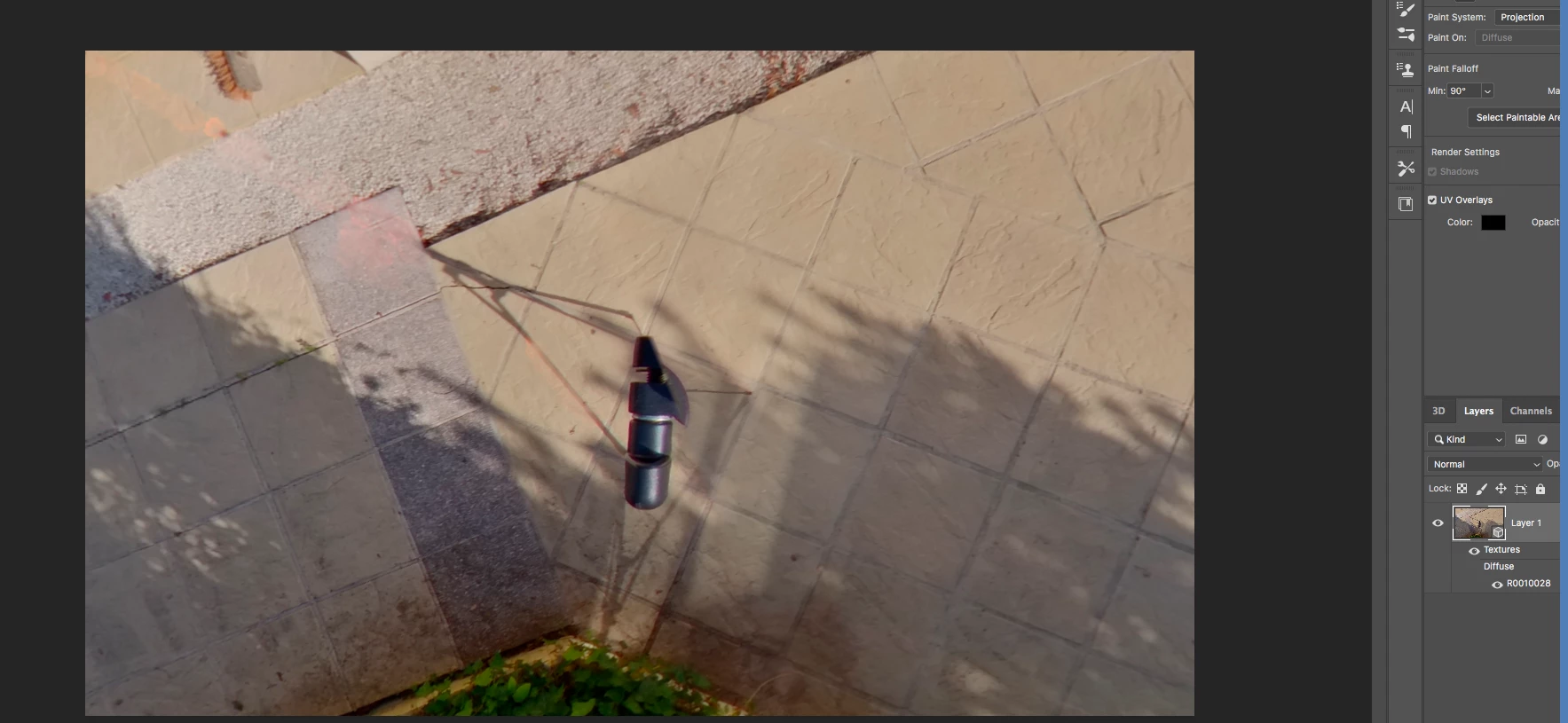
I wonder if someone can help me.  I am trying to clone out a tripod from a 360-degree image in Photoshop CC 2019 Ver 20.0.10.


But every time I use the clone tool or healing tool, I am left with a red or green tinge. In the attached picture it is red (top left corner) and I cannot find a way of stopping it from happening.


I have tried PS CC 2020. But, that version does not allow me to edit 360images


Can anyone advise, please


Thanks in advance

Mike
This topic has been closed for replies.

1 reply

JJMack
Community Expert
Community Expert
September 14, 2020

Have you stitched your images so you have a 360 spherical projection you can edit in Photoshop 3D spherical panorama.


Here I used content aware workspace

JJMack
Participating Frequently
September 14, 2020

Hi JJMack

have stitched my images so that I have a 360 spherical projection. But, I have not tried content-aware workspace. I will give that a go tomorrow. 


Thanks for your help

Mike

JJMack
Community Expert
Community Expert
September 14, 2020

Do not forget to add an empty layer on top and the merged down the patch.  You can also clone into that layer using  current and below.

JJMack