
Inspiring
October 21, 2018
Answered

Cloning tool color issue

  • October 21, 2018
  • 3 replies
  • 6856 views

When I try to use a clone tool it doesn't clone the same color as the sample. I have the blend mode to normal so I know the setting is right. Does it have to to with the original color of what I"m trying to replace? The cloned areas where supposed to be more like the area around it but obviously it was lighter.

    This topic has been closed for replies.
    Correct answer Muqqarib Hassan

    Hi,

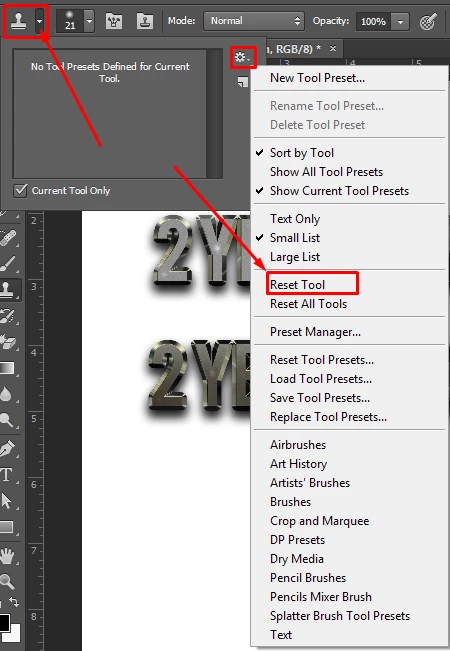
    Can I suggest you reset the Clone Tool? You select it, right click on the icon, and choose Reset Tool.

    Thanks.

    3 replies

    Chuck Uebele
    Community Expert
    Community Expert
    October 21, 2018

    In the preferences under performance, check the box to turn on use legacy compositing.

    Eugenio.NYC
    Participating Frequently
    October 21, 2018

    Hi

    Reset the tool and double check the blending mode of your layer

    Please let us know if now is working

    E

    Muqqarib Hassan
    Muqqarib HassanCorrect answer
    Inspiring
    October 21, 2018

    Hi,

    Can I suggest you reset the Clone Tool? You select it, right click on the icon, and choose Reset Tool.

    Thanks.

    Inspiring
    October 21, 2018

    I'm pretty sure that did the trick but now I have another problem. When I alt-click on the spot I want to clone my entire image gets duplicated. Not just that but when I let go of alt the dup image gets moved along with the mouse. The picture just shows the dup but I can upload a video clip to my server and show you live what's happening if you don't understand what I mean.

    EDIT: I take it back, I don't need to hold the alt key. Just switching to Clone Tool makes the image duplicate. No other tool does this.

    Muqqarib Hassan
    Inspiring
    October 21, 2018

    Hi, If i am not understanding it wrong this is your mean ?

    If this is your mean.

    It means that when you hold a alt key and click on the any area of your image and then let go the alt key. It means that you have captured that area in a clone tool. So when you move your cursor with you clicking any mouse button it will go with your cursor. So when you drag it it will paste that part of your image where its point.

    Here is a Video guide what i mean.

    Thanks.