
then I assigned a CMYK profile for an inkjet printer using clear film wide gamut inks and white ink, reverse printed and profiled through the clear media. This "wider gamut" profile provided the best preview from the other CMYK profiles that I had installed.
By @Stephen Marsh
=
Oh, you mean in "Customise proof colors" and "proof colors" checked in, right? But I also struggle to find it in its list of profiles
This will be a bit of trial and error unless you know your way around the CIELab and how to convert to CIE XYZ color space well. The benefit of this method for your situation is that you can adjust the preview you receive until your happy with the look and save a custom CMYK color space for this project.
Use Photoshops custom CMYK in Color Settings (Scroll to the top while choosing the CMYK Profile and choose "Custom", then in the next dialog under ink colors choose Custom. Now you have the option to specify tour ink colors as XYZ values. Not the best possible interface for sure, but if you know how to convert from CIELab to CIEXYZ then you can enter correct values in this area to enter expanded gamut colors. The transform is simple so I'd start there and begin with brighter more saturated CIELab values and convert those to CIEXYZ.
The advantage of this method for your problem is to create brighter primary and secondary colors so your monitor can display closer to the original RGB appearances. 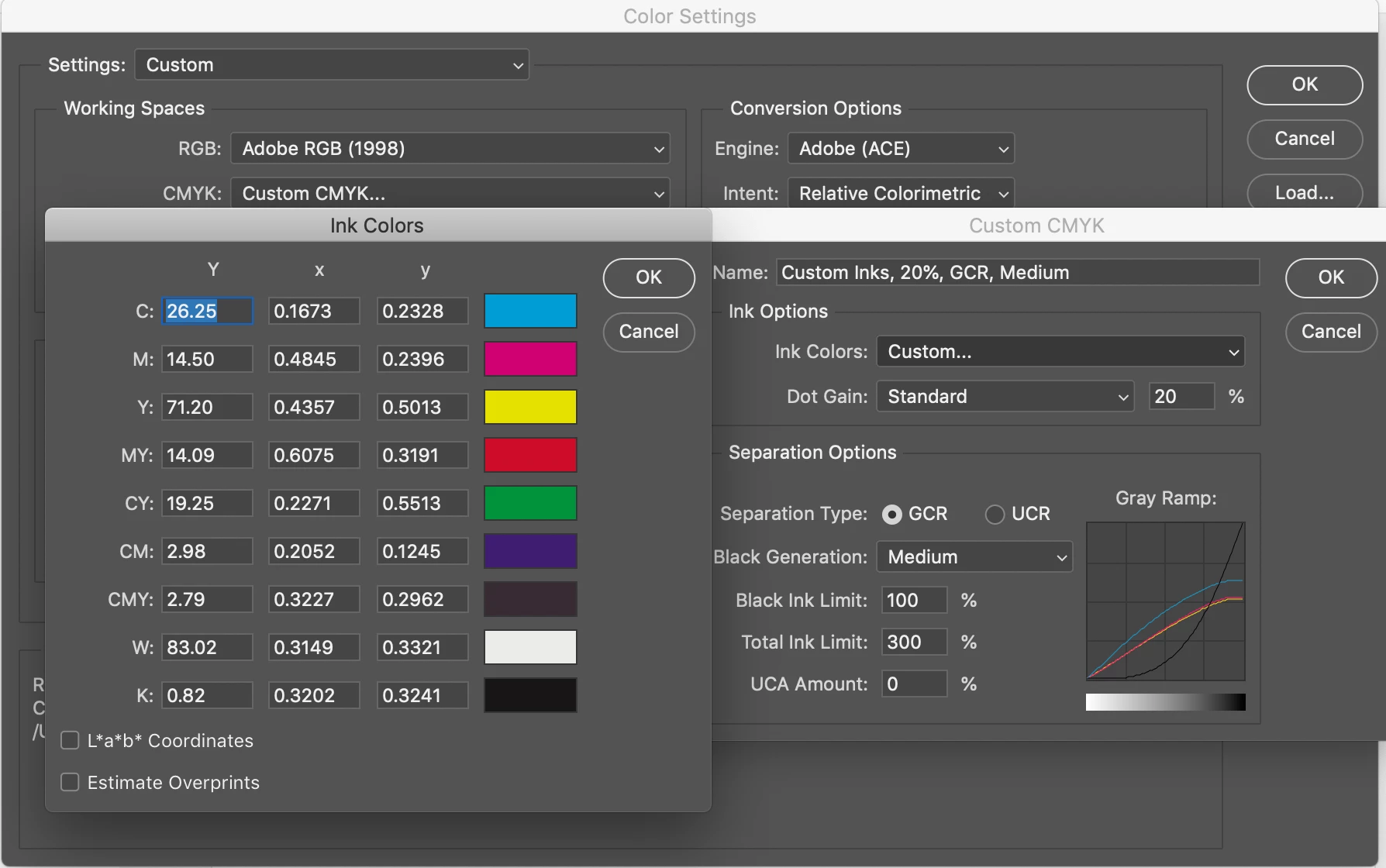




 AdChoices