
Shulipa Bernad
Inspiring
October 19, 2020
Answered

Collect a list of files from a folder.

  • October 19, 2020
  • 3 replies
  • 1341 views

Greetings everyone!
I'm trying to create a user interface containing a listbox and some buttons (find, remove and process), I wanted to make this functional as follows:
1-: When I click on the "Find" button, it will search for a folder so that I can select some images. jpg, png, tiff ......
2-: Add to Listbox a list of all selected images.
3-: How to remove an item from the Listbox using the "Remove" button.
4-: Open and do anything on each image in the list when I click the "OK" button.
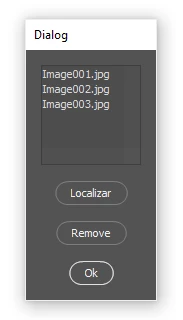

That was all I got so far. All help is valid;


dialog = new Window("dialog"); 
dialog.text = "Dialog"; 

lbx_array = ""; 
lbx = dialog.add("listbox", undefined, undefined, {name: "lbx", items: lbx_array}); 
lbx.preferredSize.width = 100; 
lbx.preferredSize.height = 100; 

b1 = dialog.add("button", undefined, undefined, {name: "b1"}); 
b1.text = "Localizar"; 

b1.onClick = function() {
    var selectedFolder = Folder.selectDialog("Please select  folder");
    var fileList= selectedFolder.getFiles(/\.(?:png|gif|jpg|bmp|tif|psd)$/i);
    lbx_array = fileList; 
    dialog.update();
}


b2 = dialog.add("button", undefined, undefined, {name: "b1"}); 
b2.text = "Remove"; 


b3 = dialog.add("button", undefined, undefined, {name: "b2"}); 
b3.text = "Ok"; 

dialog.show();


Thank you!

 
This topic has been closed for replies.
Correct answer Chuck Uebele

Try this:


var dlg = new Window('dialog','Dialog'); 

var lbx_array = []; 
var lbx = dlg.add('listbox', undefined, undefined, {name: 'lbx', items: lbx_array}); 
lbx.preferredSize.width = 300; 
lbx.preferredSize.height = 400; 

var b1 = dlg.add('button', undefined, 'Localizar' ); 

b1.onClick = function() {
    var selectedFolder = Folder.selectDialog('Please select  folder');
    var fileList= selectedFolder.getFiles(/\.(?:png|gif|jpg|bmp|tif|psd)$/i);
    lbx.removeAll();
    lbx_array = fileList; 
    for(i=0;i<lbx_array.length;i++){
        lbx.add('item',lbx_array[i])
        }
    dlg.update();
}


var b2 = dlg.add('button', undefined, undefined, {name: 'b1'}); 
b2.text = 'Remove'; 

b2.onClick = function(){
    var selNum = lbx.selection.index;
    lbx.remove(selNum);
    lbx_array.splice (selNum, 1);
    }

var b3 = dlg.add('button', undefined, undefined, {name: 'b2'}); 
    b3.text = 'Ok'; 
    b3.onClick = function(){
        var selNum = lbx.selection.index;
        var doc = open( lbx_array[selNum])
        dlg.close()
        }


3 replies

Chuck Uebele
Community Expert
Community Expert
October 19, 2020

Yea, I wasn't sure what exactly you wanted to do with opening files. If you want to open all of them, then create a loop using the lbx_array, as the length of the loop, and place the open code in the loop, with the counter to open each instance in the array.

Shulipa Bernad
Inspiring
October 19, 2020

Perfect!
Chuck Uebele  you are a genius, very grateful for your help.
Perhaps someone else can study this subject:
Final script: Updated script


var dlg = new Window('dialog','Dialog'); 

var lbx_array = []; 
var lbx = dlg.add('listbox', undefined, undefined, {name: 'lbx', items: lbx_array}); 
lbx.preferredSize.width = 300; 
lbx.preferredSize.height = 400; 

var b1 = dlg.add('button', undefined, 'Localizar' ); 

b1.onClick = function() {
    /// added feature to be able to select more than one file
    var selectedFolder = File.openDialog ("Select the file", Multiselect = true)
    var fileList = selectedFolder;
    //var selectedFolder = Folder.selectDialog('Please select  folder');
    //var fileList= selectedFolder.getFiles(/\.(?:png|gif|jpg|bmp|tif|psd)$/i);
    lbx.removeAll();
    lbx_array = fileList; 
    for(i=0;i<lbx_array.length;i++){
        lbx.add('item',decodeURI(lbx_array[i].name)); /// Added: Display only the list of file names and extensions
        }
    dlg.update();
}


var b2 = dlg.add('button', undefined, undefined, {name: 'b1'}); 
b2.text = 'Remove'; 

b2.onClick = function(){
    var selNum = lbx.selection.index;
    lbx.remove(selNum);
    lbx_array.splice (selNum, 1);
    }

var b3 = dlg.add('button', undefined, undefined, {name: 'b2'});  b3.text = 'Ok'; 
    b3.onClick = function(){
        for (var i=0;i<lbx_array.length; i++){
            var doc = open(lbx_array[i])
            alert ("My script");
        }
        dlg.close()
}

dlg.show()


Chuck Uebele
Community Expert
Chuck UebeleCommunity ExpertCorrect answer
Community Expert
October 19, 2020

Try this:


var dlg = new Window('dialog','Dialog'); 

var lbx_array = []; 
var lbx = dlg.add('listbox', undefined, undefined, {name: 'lbx', items: lbx_array}); 
lbx.preferredSize.width = 300; 
lbx.preferredSize.height = 400; 

var b1 = dlg.add('button', undefined, 'Localizar' ); 

b1.onClick = function() {
    var selectedFolder = Folder.selectDialog('Please select  folder');
    var fileList= selectedFolder.getFiles(/\.(?:png|gif|jpg|bmp|tif|psd)$/i);
    lbx.removeAll();
    lbx_array = fileList; 
    for(i=0;i<lbx_array.length;i++){
        lbx.add('item',lbx_array[i])
        }
    dlg.update();
}


var b2 = dlg.add('button', undefined, undefined, {name: 'b1'}); 
b2.text = 'Remove'; 

b2.onClick = function(){
    var selNum = lbx.selection.index;
    lbx.remove(selNum);
    lbx_array.splice (selNum, 1);
    }

var b3 = dlg.add('button', undefined, undefined, {name: 'b2'}); 
    b3.text = 'Ok'; 
    b3.onClick = function(){
        var selNum = lbx.selection.index;
        var doc = open( lbx_array[selNum])
        dlg.close()
        }


Shulipa Bernad
Inspiring
October 19, 2020

Hi Chuck Uebele. Man you are very kind, always showing up in the most difficult moments, your script worked almost 100% the way I imagined, this is a huge advance.
Since we already have all the files in the listbox, now we only need to open not only the selected item, but all of the list, each file is opened in sequence and so I can add my script with some functions in each one. Again very grateful for your attention.

 
JJMack
Community Expert
Community Expert
October 19, 2020

Sound like you want to steal(reuse)  the  code in Adobe's script Load File into a Stack. With its dialog and code you can have the user build the file list then have the script process the file list. All you would need do is the change the script function  the load files into a stack change the script name  and perhaps generate a new UUID. I have not look at the script code. You may want to.

JJMack
Shulipa Bernad
Inspiring
October 19, 2020

Did you say steal? What a nastiness, I confess that I never explored this Adobe script Load a file in a stack, maybe the answer is really in it. Grateful for the attention.

PECourtejoie
Community Expert
Community Expert
October 19, 2020

I think to remember that some of the scripts were intended as examples, so that their code could be reporposed, indeed, it might be the wrong term...