You're confusing monitor profile with calibration. They're not the same thing. The monitor profile is a description of the monitor in its calibrated state. A calibrator will write a profile after the calibration is finished.
A bad monitor profile can often affect applications differently - in fact, that's a typical smoking gun.
The monitor profile is a standard icc profile just like any other icc profile (like e.g. sRGB). It's a description, or a map, of a color space. The application uses this profile in a standard profile conversion from the document profile into the monitor profile. This is performed by the application on the fly, as you work.
If the profile is bad, the conversion gives the wrong result, and Photoshop can't display correctly. But a marginal profile, or one not written to correct icc specification, can often work in one application but fail in another.
In addition, the source color spaces can be different, and so the conversion is different, and again, one may work and the other fail.
Open the Windows color management dialog (type it in Search if you don't know where it is), take a screenshot and post it here:
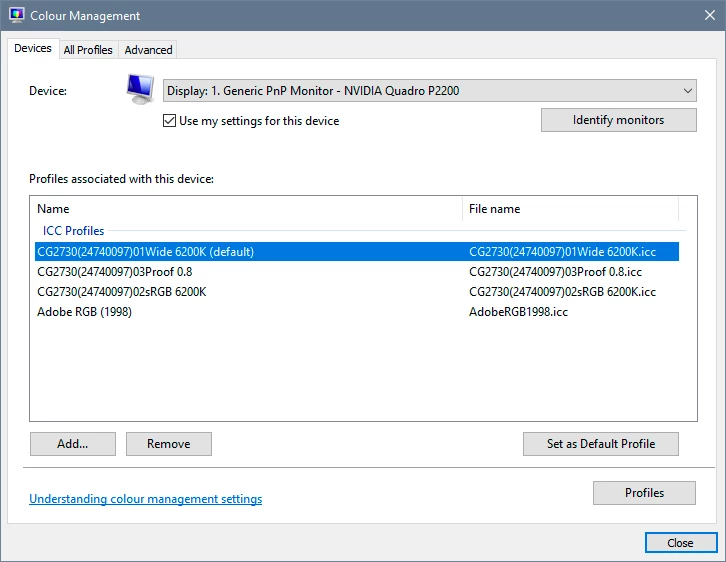
Many monitor manufacturers distribute profiles through Windows Update. These profiles are remarkably often defective in various ways. The fix is to use a calibrator, or as a temporary measure use a generic profile like sRGB or Adobe RGB (depending on type of monitor). This will not be entirely accurate, but better than a broken profile.
Applications that do not support color management don't do any of this. They just send the document RGB numbers straight to screen uncorrected. They will not be affected by a bad profile; they're not using it anyway. But they will never display accurately either.



 AdChoices