
Answered
Color displays incorrectly in Photoshop.
Almost all files that I open in Photoshop do not display colors correctly. First some examples of the issue. Then some troubleshooting steps I've taken.
Examples:
- Open a photo in CameraRAW and make adjustments, after CameraRAW finishes and the file is then opened in Photoshop, the colors do not match those from the CameraRAW preview. CameraRAW Preview:
 Open in Photoshop:
- When I export the same image from Photoshop, with wrong colors, it will show the correct coloring outside of Photoshop (Windows Explorer, Chrome, etc.).
- If I import a file after CaptureOne raw adjustments the colors look correct within Photoshop.
- If I open files without color profiles, like a PNG, the colors are changed from the original, like a color profile is being applied to them.
Troubleshooting:
- Re-install CameraRAW
- Revert Photoshop to default settings
- Use other RGB profiles (sRGB IEC61966-2.1, and others)
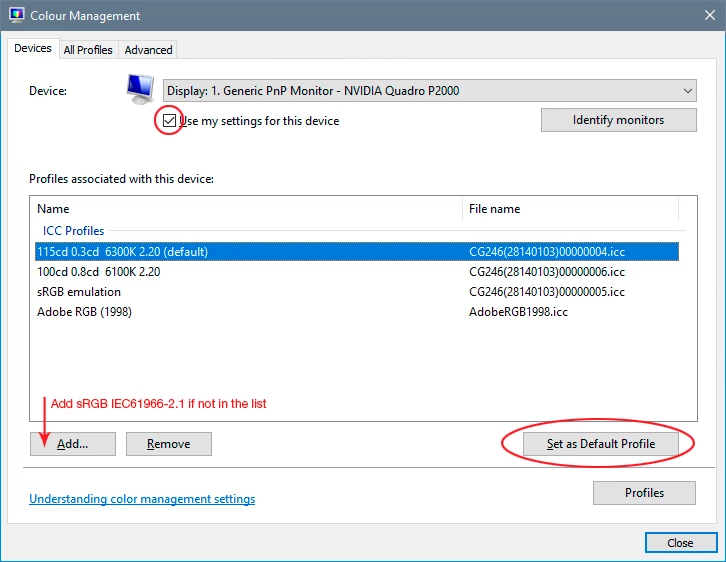
- Confirm Windows color settings match Working Spaces profile (I use ProPhoto RGB).
- Updated Photoshop via Creative Cloud app.
I am losing my mind, I can not for the life of me figure out what the issue is. Example #3 is blowing my mind, I don't see how TIFFs from CaptureONE look correct but nothing else does, including files in from CameraRAW.
Please help friends!
 AdChoices