katieac
Participant
November 17, 2016
Answered

Color Distortion in Photoshop CC

  • November 17, 2016
  • 3 replies
  • 1515 views

Hi there,

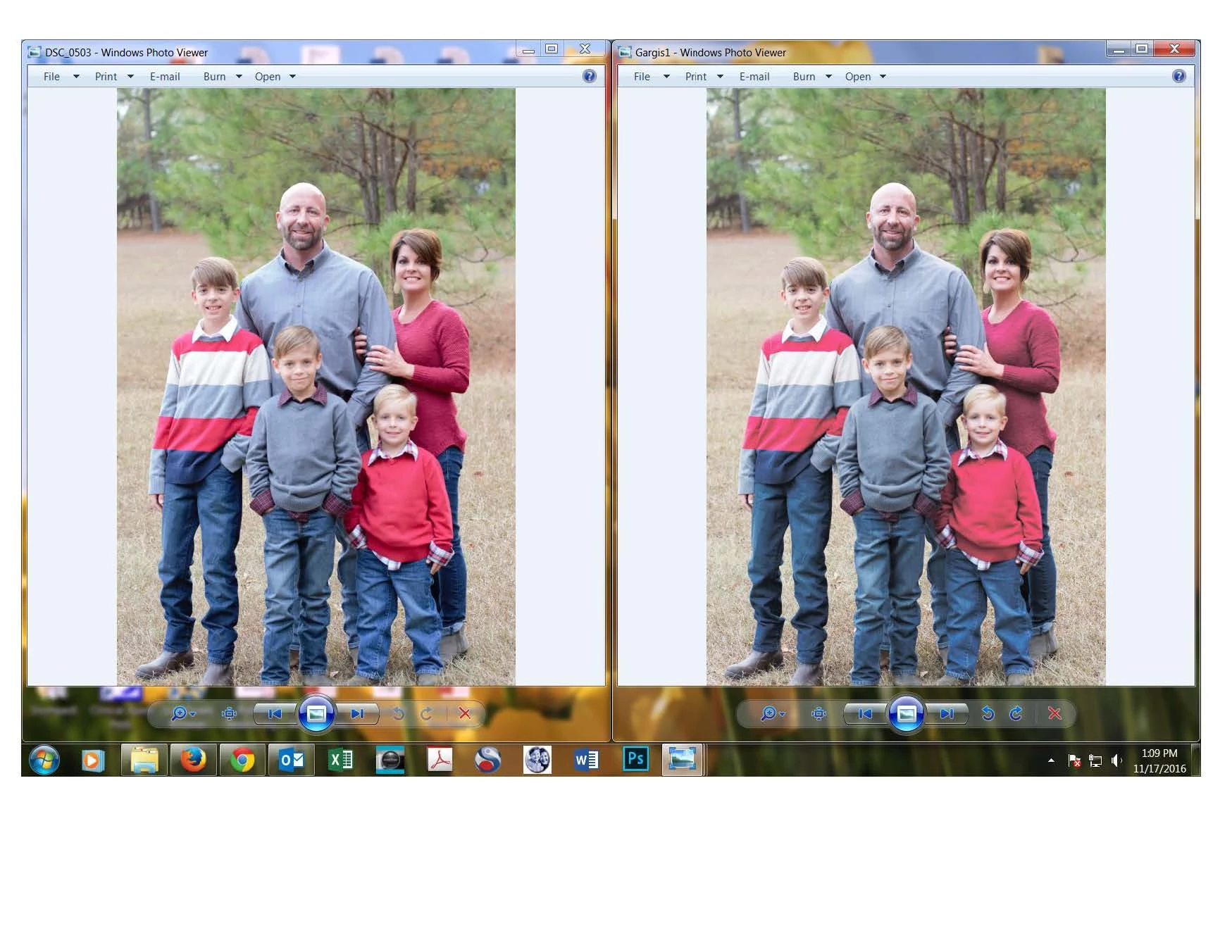
I have been using Photoshop CC for a while now and just recently had a problem come up with my RAW images.  In preview mode the images look completely fine, but when I upload to photoshop they appear overly contrasted.  They are coming up immediately upon opening them in RAW format and therefore, make it difficult to edit.  I've attached preview version first and then the jpeg version after I have uploaded and saved it through photoshop.  Please help!
    This topic has been closed for replies.
    Correct answer katieac

    Nevermind, totally just figured out I had somehow changed the color setting to Japan Color

    3 replies

    katieac
    katieacAuthorCorrect answer
    Participant
    November 29, 2016

    Nevermind, totally just figured out I had somehow changed the color setting to Japan Color

    katieac
    katieacAuthor
    Participant
    November 29, 2016

    Ok the RAW image is the one on the left and then the one on the right is the RAW image in photoshop.  See how the one on the right is hazy and the color is distorted?  I'm not sure why this just started happening a couple weeks ago.

    D Fosse
    Community Expert
    Community Expert
    November 17, 2016

    Can you post a screenshot of the file as it appears in ACR vs. Photoshop?

    Windows Photo Viewer is confusing the issue a bit here.