Participant
June 2, 2017
Answered

Color effects on images in Photoshop

  • June 2, 2017
  • 4 replies
  • 383 views

Hi,

I recently came across a preset pack (by VSCO) in which you could edit and add effects like these (https://www.google.no/search?q=vsco+distortia&source=lnms&tbm=isch&sa=X&ved=0ahUKEwin7Zuv5J_UAhXCEiwKHT_QBpcQ_AUICigB&bi…​) and i was wondering how it may be possible for me to add viewed effects to my images in Photoshop? I couldn't find any tutorials because i didn't know what to look for. Thank you.

Sincerely Casper, a upper secondary school graphic design student.
This topic has been closed for replies.
Correct answer davescm

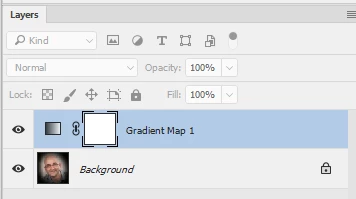
Hi take a look at gradient maps

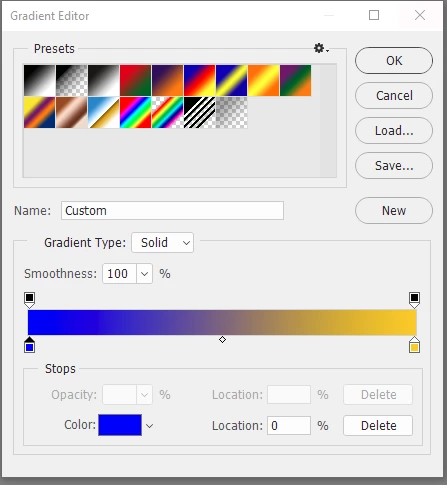
This map was applied, as an adjustment layer, over an image. Where the image is black - one end of the gradient is applied where it is white , the other end is applied (and all shades in between)

You are not limited to 2 colours - you can add as many steps to the gradient as you like

Dave

4 replies

Ver Television Online
Participant
November 26, 2022

Thanks

<a href="https://vertele.online">Ver television online</a>
caspererAuthor
Participant
June 2, 2017

Thank you!

davescm
Community Expert
davescmCommunity ExpertCorrect answer
Community Expert
June 2, 2017

Hi take a look at gradient maps

This map was applied, as an adjustment layer, over an image. Where the image is black - one end of the gradient is applied where it is white , the other end is applied (and all shades in between)

You are not limited to 2 colours - you can add as many steps to the gradient as you like

Dave

War Unicorn
Community Expert
Community Expert
June 2, 2017

Imma thinkin'...gradient map and/or color lookup tables. (Click the "create new fill or adjustment layer" button at the bottom of the Layers panel > Gradient Map and/or Color Lookup. be sure to select a lookup table (or LUT) for the latter. I'd gather that the former by itself should suit whatever you need just fine.