Participant
November 21, 2019
Answered

Color Look Up Export don't work..

  • November 21, 2019
  • 1 reply
  • 768 views

Hey to everybody here !

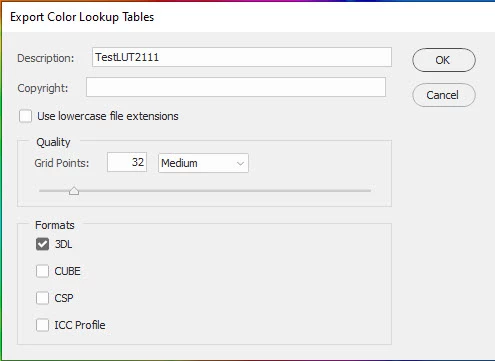
Got alittel problem : Had made some nice color effects (backgroundlayer and additonal layer for curves and color, a TIFF) Now i want to export them into the Color Look up presets (Photoshop 21.0.0,Presets, color look up) but that doesnt work...i go to : file : Export: Color Look up  and chose 3DL and middel .

Go to export and chose : Preset : 3Dl Luts...and Photoshop says :Mistake 482. (by the way, Mac Pro 10.14.6)

If i put the file by myself in this folder, it can be open with very abstract colors, and the sybol is white , not blck...it is not shown in the regular color look up tabel....

So some where i make a mistake... but where ?

Thanks a lot for any help,

Best regards, from Jürgen, Hamburg, Germany
This topic has been closed for replies.
Correct answer davescm

It works here. Set your adjustment layers then:

1. File >Export >Colour look up tables

2. Give it a name and choose the format

3. Choose where you want to save it - On Windows I've used C:\Users\daved\AppData\Roaming\Adobe\Adobe Photoshop 2020\Presets\3DLUTs     and name the file to save it.  Note : This is the user folders not the Program Files folder which just has the defaults.


To use it either :


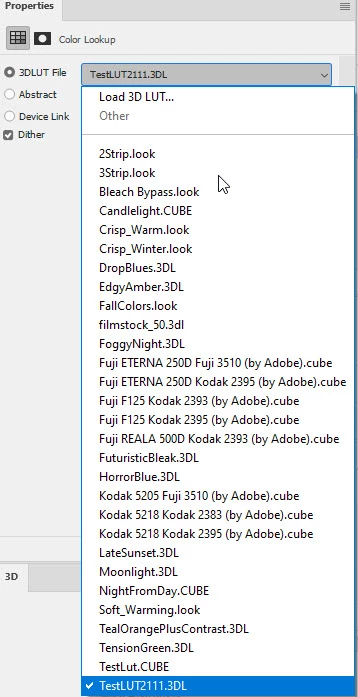
1. restart Photoshop and it will appear in the LUT list with the name you gave it in step 2

or

2. Manually load it from the LUT properties panel (which does not require the restart)


Dave


1 reply

davescm
Community Expert
davescmCommunity ExpertCorrect answer
Community Expert
November 21, 2019

It works here. Set your adjustment layers then:

1. File >Export >Colour look up tables

2. Give it a name and choose the format

3. Choose where you want to save it - On Windows I've used C:\Users\daved\AppData\Roaming\Adobe\Adobe Photoshop 2020\Presets\3DLUTs     and name the file to save it.  Note : This is the user folders not the Program Files folder which just has the defaults.


To use it either :


1. restart Photoshop and it will appear in the LUT list with the name you gave it in step 2

or

2. Manually load it from the LUT properties panel (which does not require the restart)


Dave


Participant
November 21, 2019

Hey Dave, thank you so much for your help !!!! :-)))

Indeed, it works after a restart of Photoshop ! Than the Lut file is recognized by Photoshop and shown in the regular preset: 3Dl folder.  It also works without a restart if i put my color look up file in a different folder, may be on the desktop and than click twice on : color look up open  in the adjustments panel of color look up.  But i never had the idea of restart the whole program ...looks like a way we worked 15 years ago..anyway...i am happy you solved my problem !

Tahnk you again, best regards from the rainy Hamburg , Jürgen

PS: If you are interested : Behance.net/mailac67...