
Participant
August 5, 2017
Answered

Color Not Staying To What I Select

  • August 5, 2017
  • 1 reply
  • 927 views

I've tried changing the color of my text but it's not staying on what I select after I click ok. It will change to black or white but if I select any other color it defaults to close to the middle of the color picker. I made a video showing what is happening. I'm trying to select a color in the top right corner but it defaults to the middle after I click ok, https://www.screencast.com/t/YCad6GmTHlEj .  How do I fix this?
    This topic has been closed for replies.
    Correct answer davescm

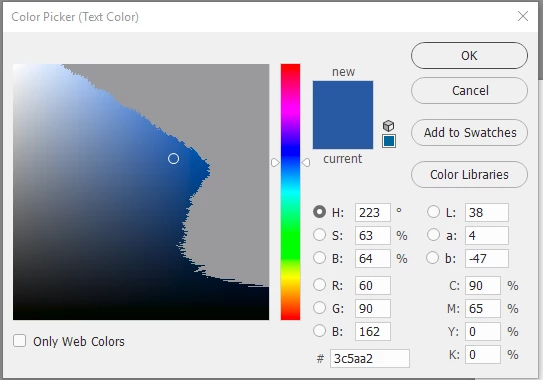
    It looks like you are in a CMYK color space and are trying to pick a colour that is out of gamut (i.e. outside the range of available colours in that mode).

    If, whilst you have the colour picker open,  you press Shift + Ctrl+ Y (Windows) or go to menu View and tick gamut warning then color picker will grey out those unavailable colors

    Dave

    1 reply

    davescm
    Community Expert
    davescmCommunity ExpertCorrect answer
    Community Expert
    August 5, 2017

    It looks like you are in a CMYK color space and are trying to pick a colour that is out of gamut (i.e. outside the range of available colours in that mode).

    If, whilst you have the colour picker open,  you press Shift + Ctrl+ Y (Windows) or go to menu View and tick gamut warning then color picker will grey out those unavailable colors

    Dave

    Participant
    August 6, 2017

    Ok thanks. How do I get out of this CMYK color space because I need to use a color in the top right color? I'm not sure how that happened as I've never changed a setting

    davescm
    Community Expert
    Community Expert
    August 6, 2017

    Go to  menu Image - Mode - RGB

    Dave