
Inspiring
February 9, 2020
Answered

Color picker is different

  • February 9, 2020
  • 3 replies
  • 1204 views

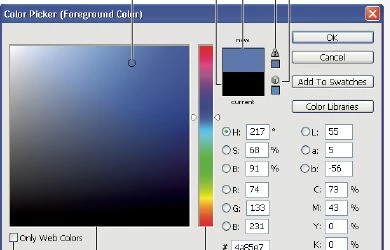
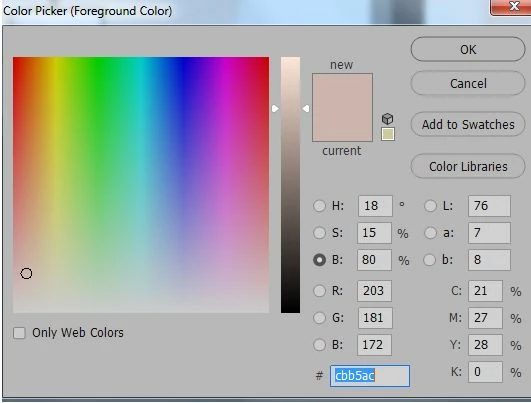
I guess it was after an update that my color picker changed and I don't like it this way.  I did fiddle around with the Color Picker Preferences but nothing seems to help.  The attacted screen shots show first the way I like it and then the way it is now.  Please help me get it back like was.
This topic has been closed for replies.
Correct answer Leslie Moak Murray

Select the "H" (stands for "Hue")  at the top instead of the "B"

3 replies

Participant
October 19, 2021

Just when I thought I was understanding Photoshop better, I stumbled on this one! Thank you very much.

manal shanableh
Legend
February 9, 2020
  • Selecting H (hue)  S (saturation) B (Brightness)
  • R G B
  • L A B

when you select any if them it will give you different show of colors, try them.


pslane1Author
Inspiring
February 10, 2020

Thank you both!

Leslie Moak Murray
Community Expert
Leslie Moak MurrayCommunity ExpertCorrect answer
Community Expert
February 9, 2020

Select the "H" (stands for "Hue")  at the top instead of the "B"