
Participant
November 1, 2023
解決済み

Color Picker Not Showing Correct Color

  • November 1, 2023
  • 返信数 1.
  • 693 ビュー

Hi,

I have encountered an issue with my color picker. This is something I have never encountered before, and I am extra confused because this occurred in the middle of me working on a drawing. I am unsure if it simply bugged out or I accidentally pressed a button or what.
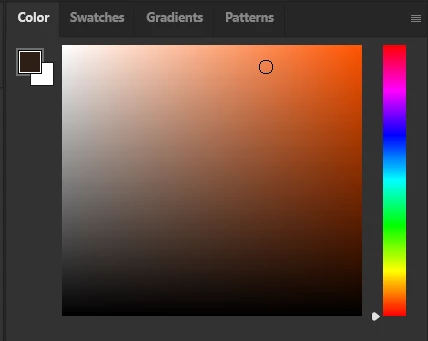


As you can see, the color selected (a dark brown) is not what is being represented in the color picker. I don't know why this is the case. I can use the eye dropper to select multiple different colors from my picture but the color picker does not update unless I choose one directly from it. I'm using Photoshop 2024. Have already tried resetting preferences and re-installing Photoshop. Any ideas what's up here?

このトピックへの返信は締め切られました。
解決に役立った回答 Ged_Traynor

@Emma33303204ufk1 if you're using Photoshop version 25.1, it's a known bug

https://community.adobe.com/t5/photoshop-ecosystem-bugs/photoshop-2024-color-sliders-don-t-work/idc-...

You can revert back to version 25.0 until Adobe address the issue

返信数 1

Ged_Traynor
Community Expert
Ged_TraynorCommunity Expert解決!
Community Expert
November 1, 2023

@Emma33303204ufk1 if you're using Photoshop version 25.1, it's a known bug

https://community.adobe.com/t5/photoshop-ecosystem-bugs/photoshop-2024-color-sliders-don-t-work/idc-...

You can revert back to version 25.0 until Adobe address the issue

Participant
January 22, 2024

Updated 25.5 and still not working?!?! come on Adobe 😞 

ay ideas on how to get around this? use that tool ALL the time with colours of branding