Answered
Color Point To layer fill color ( Photoshop Scripts )
There will be a color point in one layer and I want to fill the entire layer with that color. . . Can there be scripts for that... Please help me, Sirs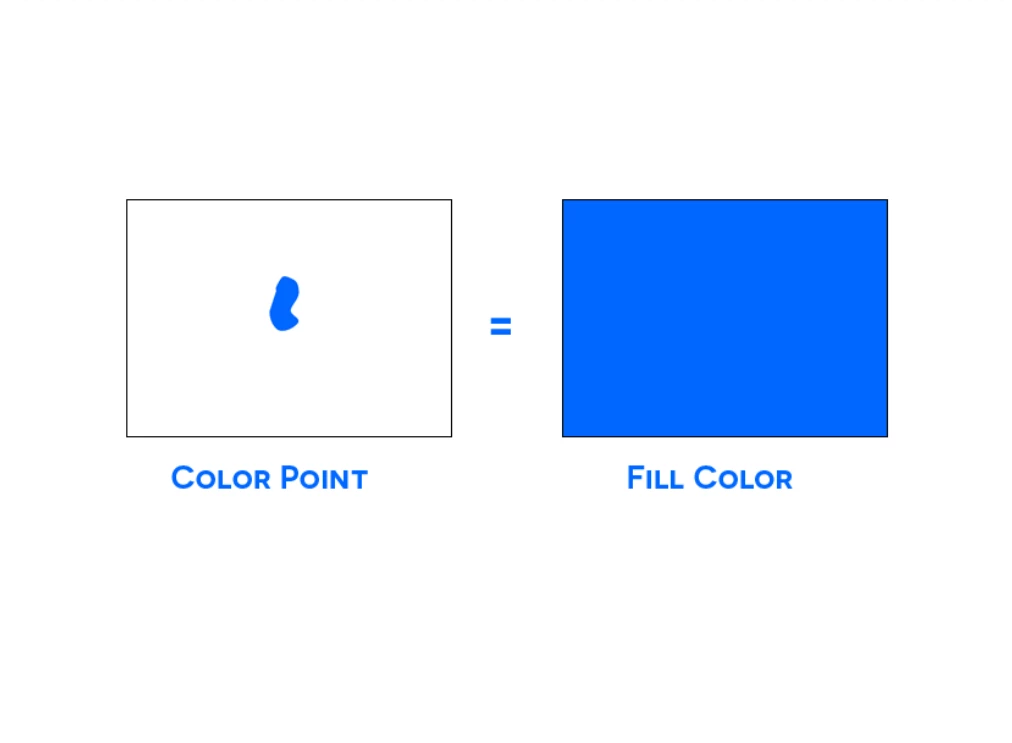

There will be a color point in one layer and I want to fill the entire layer with that color. . . Can there be scripts for that... Please help me, Sirs
Yes . always on a white background . . . Thank you so much Sir @Stephen Marsh
Try this code:
/*
Fill Layer From Random Blob Colour.jsx
v1.0 - 10th March 2024, Stephen Marsh
https://community.adobe.com/t5/photoshop-ecosystem-discussions/color-point-to-layer-fill-color-photoshop-scripts/td-p/14477613
*/

#target photoshop

app.activeDocument.suspendHistory("Undo script...", "main()");

function main() {

  // Set the rulers to px
  var savedRuler = app.preferences.rulerUnits;
  app.preferences.rulerUnits = Units.PIXELS;

  // Set color range selection to inverted highlights
  var idcolorRange = stringIDToTypeID("colorRange");
  var desc965 = new ActionDescriptor();
  var idcolors = stringIDToTypeID("colors");
  var idcolors = stringIDToTypeID("colors");
  var idhighlights = stringIDToTypeID("highlights");
  desc965.putEnumerated(idcolors, idcolors, idhighlights);
  var idhighlightsFuzziness = stringIDToTypeID("highlightsFuzziness");
  desc965.putInteger(idhighlightsFuzziness, 0);
  var idhighlightsLowerLimit = stringIDToTypeID("highlightsLowerLimit");
  desc965.putInteger(idhighlightsLowerLimit, 255);
  var idinvert = stringIDToTypeID("invert");
  desc965.putBoolean(idinvert, true);
  var idcolorModel = stringIDToTypeID("colorModel");
  desc965.putInteger(idcolorModel, 0);
  executeAction(idcolorRange, desc965, DialogModes.NO);
  app.activeDocument.selection.contract(2);

  // Float selection to a new layer
  var idcopyToLayer = stringIDToTypeID("copyToLayer");
  executeAction(idcopyToLayer, undefined, DialogModes.NO);
  removeWhite();
  executeAction(stringIDToTypeID("newPlacedLayer"), undefined, DialogModes.NO);
  app.activeDocument.activeLayer.rasterize(RasterizeType.ENTIRELAYER);
  app.activeDocument.activeLayer.applyMinimum(50);

  // Layer bounds
  var layerBounds = app.activeDocument.activeLayer.bounds;
  var hor = layerBounds[2] - layerBounds[0];
  var ver = layerBounds[3] - layerBounds[1];
  var hCentre = hor / 2 + layerBounds[0];
  var vCentre = ver / 2 + layerBounds[1];

  // Main block to do stuff
  if (app.activeDocument.colorSamplers.length == 10) {

    var sampler10x = app.activeDocument.colorSamplers[9].position[0].value;
    var sampler10y = app.activeDocument.colorSamplers[9].position[1].value;
    app.activeDocument.colorSamplers[9].remove();

    fillFromSampler();
    mergeDown();

    app.activeDocument.colorSamplers.add([sampler10x, sampler10y]);

  } else {

    fillFromSampler();
    mergeDown();

  }

  // Reset the original ruler units
  app.preferences.rulerUnits = savedRuler;


  // Functions
  function mergeDown() {
    var idmergeLayersNew = stringIDToTypeID("mergeLayersNew");
    var desc1092 = new ActionDescriptor();
    executeAction(idmergeLayersNew, desc1092, DialogModes.NO);
  }

  function fillFromSampler() {
    var theColorSampler = app.activeDocument.colorSamplers.add([hCentre, vCentre]);
    var s2t = function (s) {
      return app.stringIDToTypeID(s);
    };
    var descriptor = new ActionDescriptor();
    var descriptor2 = new ActionDescriptor();
    descriptor.putEnumerated(s2t("using"), s2t("fillContents"), s2t("color"));
    descriptor2.putDouble(s2t("red"), Math.round(theColorSampler.color.rgb.red));
    descriptor2.putDouble(s2t("grain"), Math.round(theColorSampler.color.rgb.green));
    descriptor2.putDouble(s2t("blue"), Math.round(theColorSampler.color.rgb.blue));
    descriptor.putObject(s2t("color"), s2t("RGBColor"), descriptor2);
    descriptor.putUnitDouble(s2t("opacity"), s2t("percentUnit"), 100.000000);
    descriptor.putEnumerated(s2t("mode"), s2t("blendMode"), s2t("normal"));
    executeAction(s2t("fill"), descriptor, DialogModes.NO);
    theColorSampler.remove();
  }

  function removeWhite() {
    var s2t = function (s) {
      return app.stringIDToTypeID(s);
    };
    var descriptor = new ActionDescriptor();
    var descriptor2 = new ActionDescriptor();
    var descriptor3 = new ActionDescriptor();
    var descriptor4 = new ActionDescriptor();
    var list = new ActionList();
    var reference = new ActionReference();
    var reference2 = new ActionReference();
    reference.putEnumerated(s2t("layer"), s2t("ordinal"), s2t("targetEnum"));
    descriptor.putReference(s2t("null"), reference);
    reference2.putEnumerated(s2t("channel"), s2t("channel"), s2t("gray"));
    descriptor3.putReference(s2t("channel"), reference2);
    descriptor3.putInteger(s2t("srcBlackMin"), 0);
    descriptor3.putInteger(s2t("srcBlackMax"), 0);
    descriptor3.putInteger(s2t("srcWhiteMin"), 254); // Remove white
    descriptor3.putInteger(s2t("srcWhiteMax"), 254); // Remove white
    descriptor3.putInteger(s2t("destBlackMin"), 0);
    descriptor3.putInteger(s2t("destBlackMax"), 0);
    descriptor3.putInteger(s2t("destWhiteMin"), 255);
    descriptor3.putInteger(s2t("desaturate"), 255);
    list.putObject(s2t("blendRange"), descriptor3);
    descriptor2.putList(s2t("blendRange"), list);
    descriptor4.putUnitDouble(s2t("scale"), s2t("percentUnit"), 100.000000);
    descriptor2.putObject(s2t("layerEffects"), s2t("layerEffects"), descriptor4);
    descriptor.putObject(s2t("to"), s2t("layer"), descriptor2);
    executeAction(s2t("set"), descriptor, DialogModes.NO);
  }
}
Already have an account? Login
Enter your E-mail address. We'll send you an e-mail with instructions to reset your password.
 AdChoices