
matthewh43424282
Participant
August 16, 2019
Question

"Color Profile Doesn't Match" but it does?

  • August 16, 2019
  • 2 replies
  • 716 views

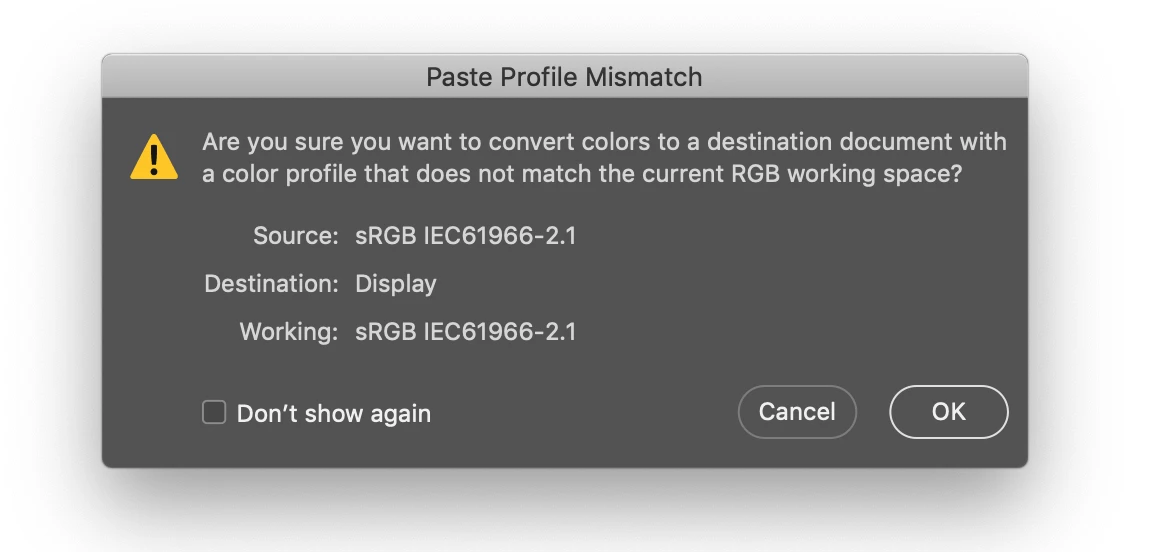
I recently moved over to a Mac and one of the problems that has arisen is the fact that when I import something from Ai the color profile is fine. However when I move it into another photoshop document it says the profile doesn't match the working space RGB- but it does! So weird. Curious if I'm doing something wrong and if theres a quick fix?
This topic has been closed for replies.

2 replies

D Fosse
Community Expert
Community Expert
August 16, 2019

First of all, you should be aware that an image with your display profile embedded is effectively not color managed at all. The only proper occasion for using the display profile is in screenshots, which should then promptly be converted into a standard color space like sRGB or Adobe RGB.

The message itself is can safely be ignored.

All it says is that you're converting into a different profile than your working space - the proper response to which is "so what". The working space isn't important. The embedded document profile will and should always override it.

All these mismatch warnings can be disabled in Color Settings. I haven't seen one in 15 years.

Earth Oliver
Legend
August 16, 2019

you're not reading that mismatch correctly... it says that your Source is sRGB and your working space is sRGB, but the destination is Display. You need to change your destination doc to sRGB, using edit>convert to profile, sRGB.