Participant
August 28, 2021
Question

Color Profile Settings - Photoshop CC

  • August 28, 2021
  • 2 replies
  • 259 views

Hi,

Any Idea regarding where the color profile settings are lying in photoshop installation?
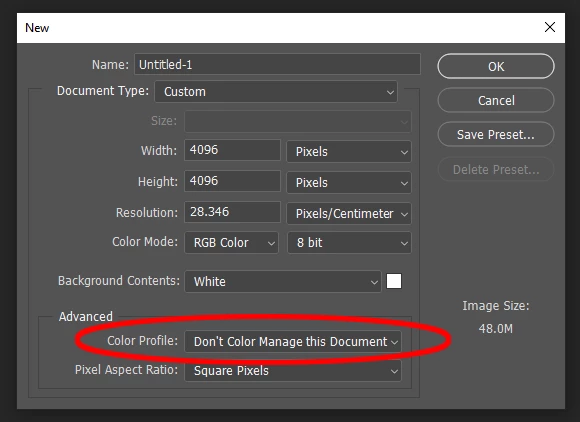
Regards...

This topic has been closed for replies.

2 replies

D Fosse
Community Expert
Community Expert
August 28, 2021

In that dialog you're just supposed to enter the color space you want to work in - sRGB, Adobe RGB, ProPhoto etc.


It doesn't really involve the full color settings. In any case, the document profile will override the color settings.


But yes, this rolldown has an annoying habit of defaulting to "don't color manage", which makes no sense. It should either be the last used, or working space. But as long as you're aware of it, it's not a big deal.


I'd recommend setting up this in order to have full control of the document's color space. That way, you always know at a glance:

Ged_Traynor
Community Expert
Community Expert
August 28, 2021

Hi

You'll find them in the Edit menu