Doc_Pit
Inspiring
July 29, 2018
Answered

Color profiles mismatch problem
  • July 29, 2018
  • 1 reply
  • 1855 views

    This topic has been closed for replies.
    Correct answer D Fosse

    There's no error here. Everything acts normally.

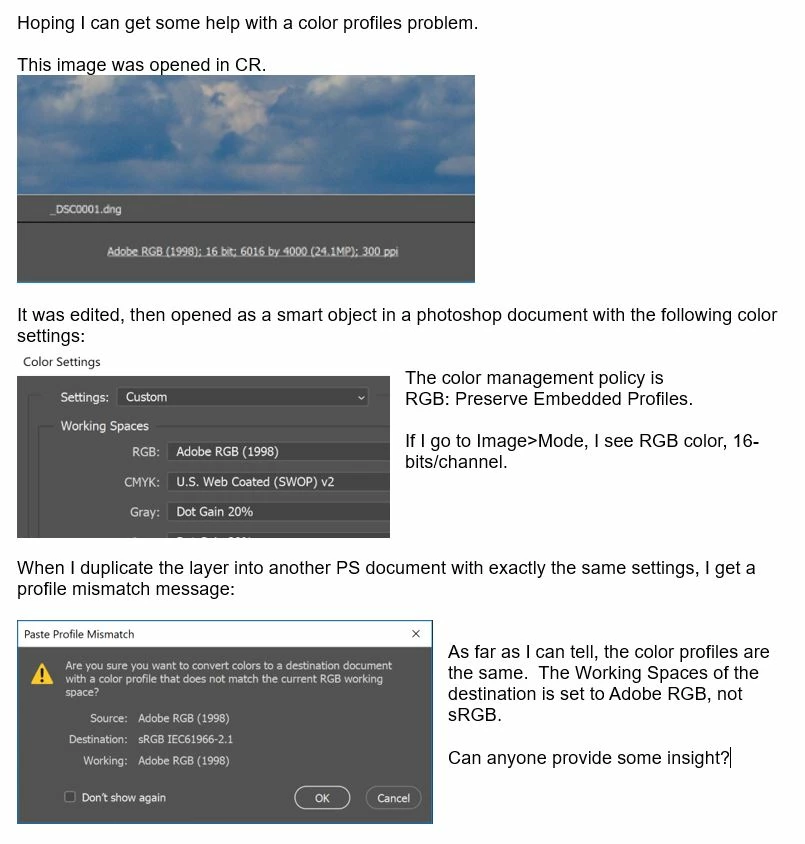
    The OP just has another document in sRGB, with the sRGB profile embedded. He's pasting into that. We don't know where that came from, but it just happens to be an sRGB file.

    Again, the working space plays no part in any of this. Any file coming out of ACR already has a profile, set in the ACR workflow options. Here it's Adobe RGB. The file from ACR opens into Photoshop with that profile, regardless of what the working space is.

    The mismatch dialog is a nuisance, and I've always kept it off. It doesn't tell you anything useful. Much better to set the notification area as above, this way you always know at a glance what color space any file is in.

    1 reply

    D Fosse
    Community Expert
    Community Expert
    July 29, 2018

    The working space isn't important; that's just a default for new files. Any embedded profile, whatever it is, will be preserved and follow the file. That's what "preserve embedded profiles" means. And that's how it should be.

    The easiest way to keep track of profiles is to set the notification area bottom left:

    Doc_Pit
    Doc_PitAuthor
    Inspiring
    July 30, 2018

    Can you point-out to me what is generating the message?  Where is the mismatch between the file sent (the duplicated layer) and the receiving document?

    D Fosse
    Community Expert
    D FosseCommunity ExpertCorrect answer
    Community Expert
    July 30, 2018

    There's no error here. Everything acts normally.

    The OP just has another document in sRGB, with the sRGB profile embedded. He's pasting into that. We don't know where that came from, but it just happens to be an sRGB file.

    Again, the working space plays no part in any of this. Any file coming out of ACR already has a profile, set in the ACR workflow options. Here it's Adobe RGB. The file from ACR opens into Photoshop with that profile, regardless of what the working space is.

    The mismatch dialog is a nuisance, and I've always kept it off. It doesn't tell you anything useful. Much better to set the notification area as above, this way you always know at a glance what color space any file is in.
