

schroef
Inspiring
December 27, 2020
Question

Color shift from PS 21 OSX to Windows

  • December 27, 2020
  • 2 replies
  • 541 views

Does anyone have experience with shifting colors going from OSX to Windows. I got artwork linked in from AI files and when opened on the windows machine the links need to be updated. On doing so i notice A. the image shifts location (see green rectangles) B. the color vibrancy seems to be shifting. Ive tried to make clear comparisons. These are screen grabbed from photoshop.
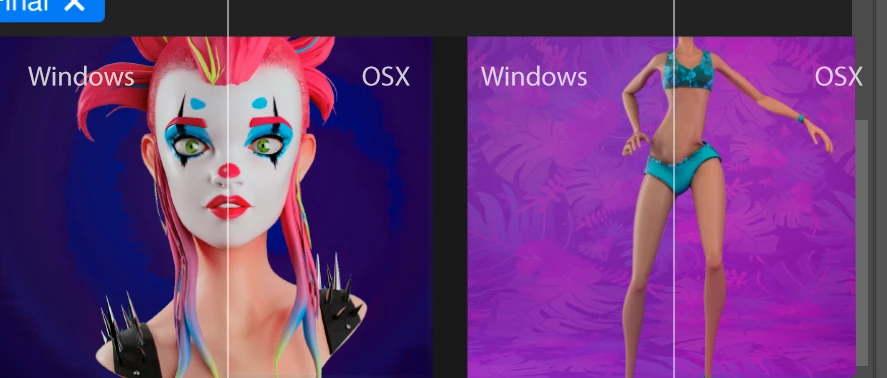
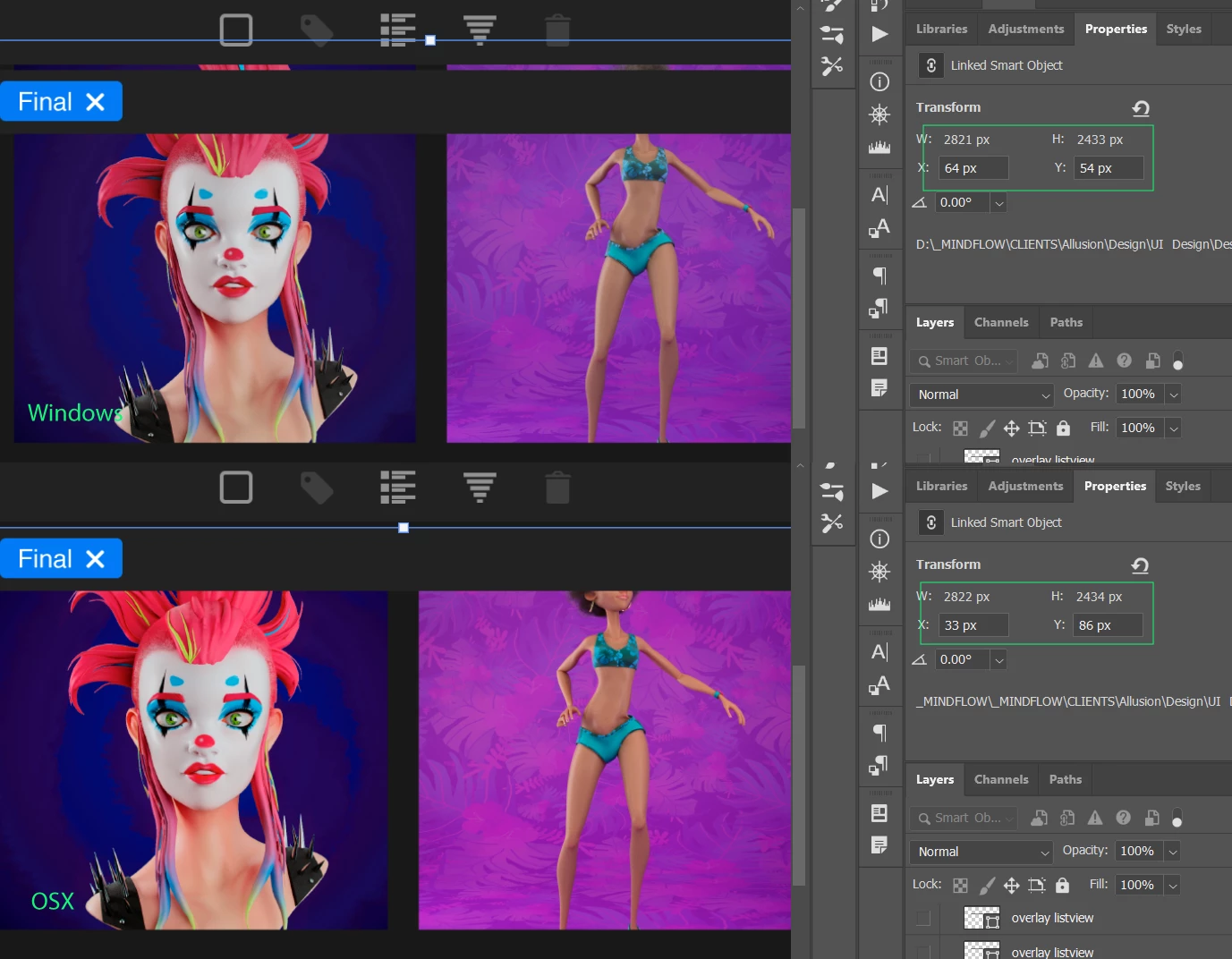


Ive check Colors Settings and im using same as on OSX. I understand that the display would look different. But relinking a file should not have this big influence. Also in Illustrator where the linked files are created they look different, less vibrant.


Ive also checked my illustrator settings and they are the same as on OSX

This topic has been closed for replies.

2 replies

D Fosse
Community Expert
Community Expert
December 28, 2020

PNGs will easily lose any embedded profiles for two reasons:


  • In Export/Save For Web, "embed color profile" is unchecked by default. It needs to be manually checked. IMO this is an outdated policy that Adobe should change immediately, that box should be checked by default. But until then, check it.
  • In a normal Save As, the profile is stripped from PNGs only. All other formats are fine. This is a bug that has gone curiously unnoticed for a long time.


In other words, the only way to get an embedded profile in a PNG, is to use Export/SFW and remember to check the "embed profile" box. Don't use Save As.


And without a profile, the working space kicks in, whatever it happens to be on the machine in question.

schroef
schroefAuthor
Inspiring
December 28, 2020

I know all of this. The downfall is that Photoshop does allow a user to embed a profile in PNG format, illustrator does not. Another remark, the "save as" dialog will not embed a profile when using PNG. the webdialog will.


Below you see the embed option missing in illustrator, both show the webdialog.


If i recall it correct, the original PNG came from Blender and i did not alter it in Photoshop to embed a correct color profile.


I have all the knowledge about the export and method and know almost all cons and pros of each. 
I kinda disected the layer comps script in photoshop and made aa altered version which also does artboard and layer comps together. Therefor iver seen most settings and noticed some differences as well. Also the difference between apps are still there 😞

D Fosse
Community Expert
Community Expert
December 27, 2020

Do you have an accurate monitor profile on both systems? One made with a calibrator? If not, you can't expect them to display identically (and you can't know which one is correct, if any of them).


Also: does the image have an embedded color profile? Which one? Both the source image and the "master" smart object.


Check here:


schroef
schroefAuthor
Inspiring
December 28, 2020

Im viewing this on my Windows laptop using sRGB color profile. These previews you see are both on the windows machine. I wasnt clear i guess with what im trying to explan. The OSX view is the file when the link is not updated. When i update the links on the windows machine then i see color shifts.


Tomorrow i will double check these same files on my Mac machine. Perhaps im just using old files.


I did some more research in other little issues i noticed. It seems Windows doesnt read all meta data from PNG files. I checked those PNG files and they have sRGB included. When i check that linked PNG in illustrator is shows RGB and not sRGB. When i view a JPG image is does show that.


Another thing could be that if the profile is indeed missing. Perhaps it OSX showing more vibrant colors vs how windows treats a general RGB without color profile embedded. 


Ive also noticed before that when you check the profile in photoshop using "convert to profile", it will show a profile even when on is missing. Though when i check  embedded profile using the small menu in bottom left corner, it does state the PNG has sRGB. Also on opening i dont get profile mismatch warning. So it must be correct.


Upon checking a couple of the PNG files, i did find this image does have a profile attached. This image also showed less vibrant. However the image with the girl with pink hair does have the profile?!?!?

schroef
schroefAuthor
Inspiring
December 28, 2020

I updated this image with purple background with a new version which does have a sRGB profile embedded. It actually makes no difference. Perhaps these are just old cache preview or so. Im not always 100% sure how Adobe handles linked images etc. It should not matter, im using same color settings and profiles on both systems.


I think i really need to double-check this on the mac system and see how they view on that system.

Ill make JPG and PNG export now in sRGB from the windows machine so i can do proper comparison.


I did know how to check the profile, but thanks for showing.

PS this is the little bug i was talking about in photoshop. 

When you convert an image to a different color profile or color space. In the top left we see the sources profile. Notice how it shows sRGB, that is FALSE! notice the image is untagged and opened without assigning any profile. I think photoshop auto assigns sRGB when opening, but that should not happen. But thats something else, just wanted to show it.