
Color shift when exporting from LR into PS
I have read numerous articles about this, and I still have a problem.
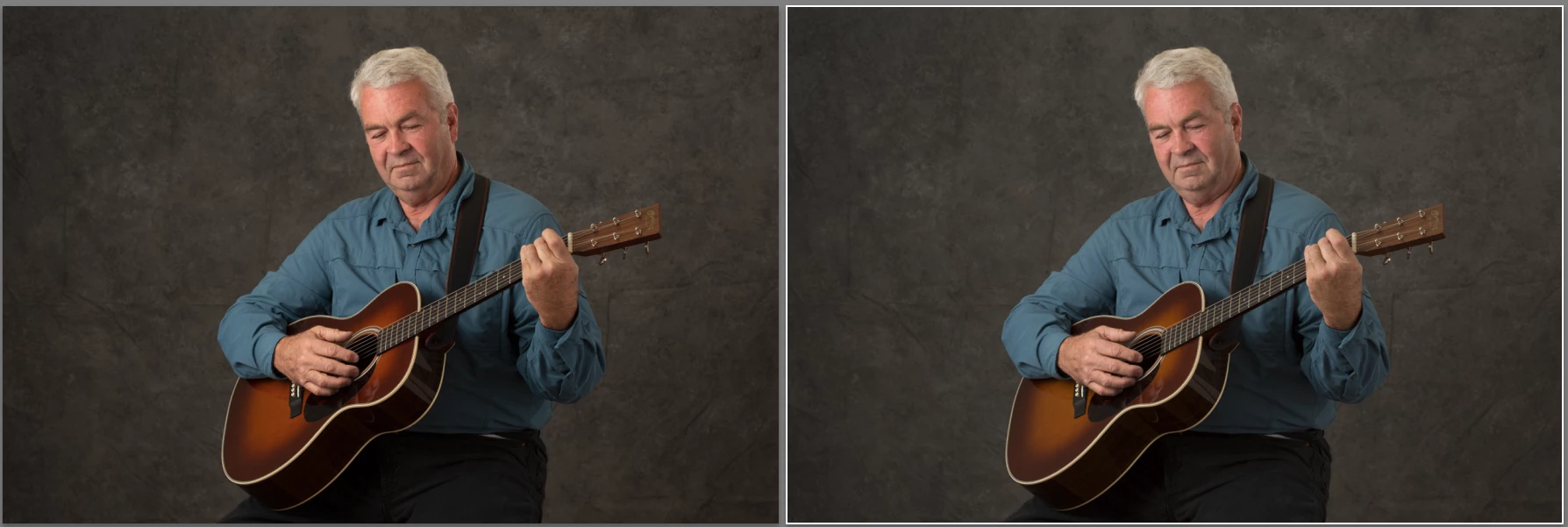
When I export a RAW image from LR into PS (using CTL/CMD-E), the image appears in PS with a color shift, generally appearing with deeper saturation and more reddish hues. In the example attached here, the image on the right is the RAW image as displayed in LR. The image on the left is the same image opened in PS, but no changes made in PS, just simple saved and returned to LR. As you can see in the body of the guitar and in the man's face, the colors do not match.
My LR use a ProPhoto color space. PS is set to use the embedded profile of the image; this I know because in PS I have the color settings set up to warn me when I open a file with a profile mismatch, which it did and I selected the option to use the embedded profile. Nonetheless, the colors still shifted.
Now, I just calibrated my monitor and PS was using that as its working space. Just to see, I changed the working space on PS to ProPhoto to match LR. No warning about a profile mismatch this time, as expected, still set to use embedded profiles, and . . . same result.
Any help is greatly appreciated as to what could be going on. I want the colors to match between LR and PS, especially since I export proofs from LR and I would prefer to show my clients the colors they can expect (especially brides who picked the colors of their decor particularly).
Thank you in advance.
 AdChoices