Participant
June 23, 2017
Answered

Color switches randomly between clicks or program swaps.

  • June 23, 2017
  • 1 reply
  • 278 views

I'm having the weirdest problem..the color shifts to super saturated but will go back to normal if I switch between windows or programs.

It's not a profile file thing because I can just click on another pane and it pops back to normal. It seems to be getting more frequent and it's starting to get more than just mildly annoying.

I'm using:

CC 2017

Mac Pro (mid 2012)

OS X El Capitan 10.11.6

3.33 GHz 6-Core Intel Xeon

32 GB 1333 MHz DDR3 EGG

ATI Randeon HD 5770 1024 MB

Is this happening to anyone else?
This topic has been closed for replies.
Correct answer S_Gans

Hi. I have the same machine with a very similar setup, and don't have the problem you describe. The only thing I can attribute this to is that CC2017 has some pretty high graphics specs, and although you're within their "recommended" range, you may be putting a strain on the Radeon card (Photoshop system requirements)

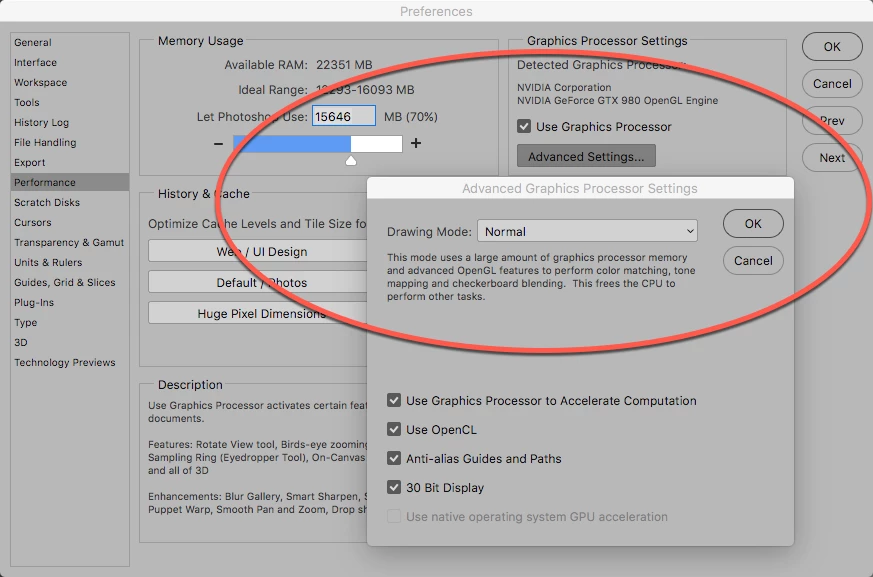
In the screenshot, you'll see I actually upgraded my graphics card, but for your card, I'd recommend going to Photoshop>Preferences>Performance and try changing the drawing mode to Normal under The Advanced Graphics Processor settings. Or, try changing some of the other settings on and off, to see if you can make the issue resolve itself.

By the way, one of the reasons I upgraded the card was because Adobe software really seems to like the NVidia cards better for many things (Photoshop being the least of them, though), and the new card has 4GB of RAM.

1 reply

S_Gans
Community Expert
S_GansCommunity ExpertCorrect answer
Community Expert
June 24, 2017

Hi. I have the same machine with a very similar setup, and don't have the problem you describe. The only thing I can attribute this to is that CC2017 has some pretty high graphics specs, and although you're within their "recommended" range, you may be putting a strain on the Radeon card (Photoshop system requirements)

In the screenshot, you'll see I actually upgraded my graphics card, but for your card, I'd recommend going to Photoshop>Preferences>Performance and try changing the drawing mode to Normal under The Advanced Graphics Processor settings. Or, try changing some of the other settings on and off, to see if you can make the issue resolve itself.

By the way, one of the reasons I upgraded the card was because Adobe software really seems to like the NVidia cards better for many things (Photoshop being the least of them, though), and the new card has 4GB of RAM.

Adobe Community Expert / Adobe Certified Instructor