minglessis
Inspiring
March 24, 2023
Answered

color to transparent gradient missing from the gradient editor

  • March 24, 2023
  • 2 replies
  • 1594 views

Hi,

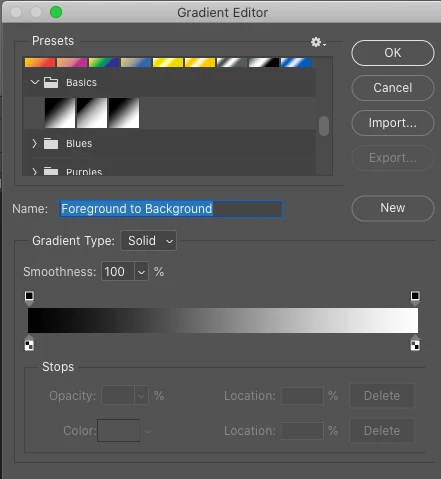
I´m trying to create a color-to-transparent gradient but can´t find the color-to-transparent option in the editor. On my macbookpro I see it under the basic presets.

I´m using PS 22 on MacOS Catalina.

Please advise, thank you in advance


This topic has been closed for replies.
Correct answer Jeff Arola

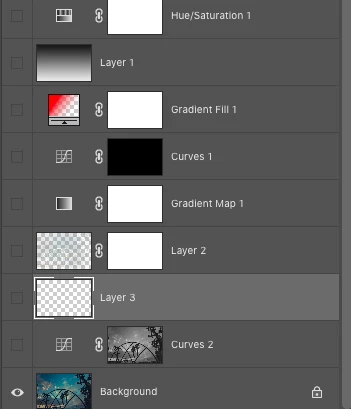
A follow question, if you don´t mind. Can I change that only to the gradient but still keep my new layer white?

Now I see the checkerboard also in the new layers and I don´t like that.  


The Grid Size and Grid Colors is universal so it affects all aspects of the document.


You could make a feature request to be able to apply Transparency Settings differently

for one kind of layer or another.


One purpose of the Checkerboard pattern is so it's easy to tell if there is transparency in a document and/or layer.


2 replies

Jeff Arola
Community Expert
Community Expert
March 24, 2023

Go to Photoshop>Preferences (Settings)>Transparency & Gamut>Transparency Settings and make sure the Grid Size is set to something other than None


The Foreground to Transparent is the middle gradient in the Basics.


minglessis
Inspiring
March 24, 2023

Excellent, that was it!

minglessis
Inspiring
March 24, 2023

A follow question, if you don´t mind. Can I change that only to the gradient but still keep my new layer white?

Now I see the checkerboard also in the new layers and I don´t like that.  


minglessis
Inspiring
March 24, 2023

Actually, I was able to create one color to transparent gradient by manually bringing the opacity to zero, but in the editor the transparency shows as white, not as a checkerboard.

How can I make it checkerboard?