crayf67803202
Participant
November 22, 2019
Frage

Colors in photoshop dull across the board

  • November 22, 2019
  • 3 Antworten
  • 293 Ansichten

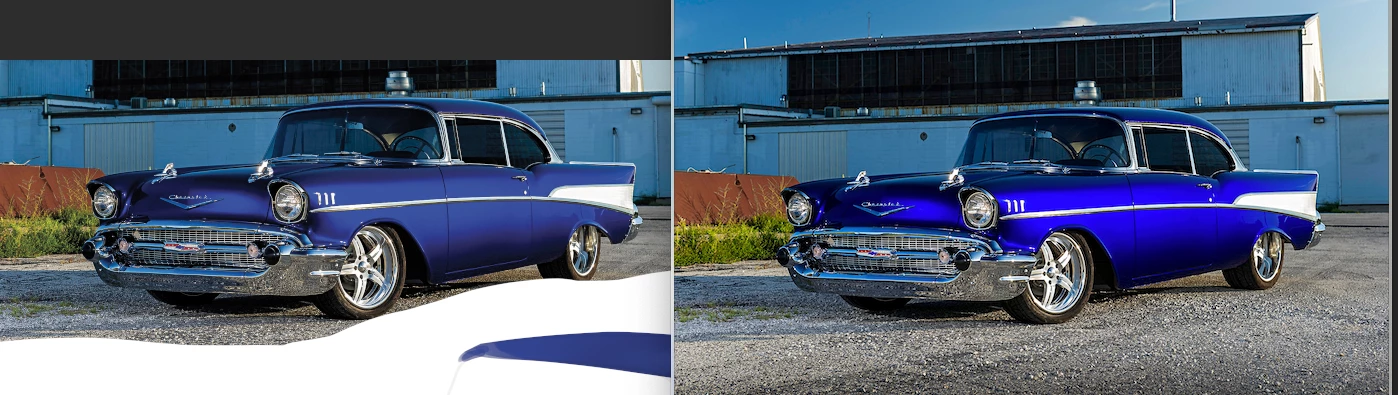
Im trying to emulate a color in a digital illustration, but i can't get the colors to be vibrant even when importing an original image. Are there settings im missing? Left is reference photo embedded into photoshop, right is the actual image. 
Dieses Thema wurde für Antworten geschlossen.

3 Antworten

rob day
Community Expert
Community Expert
November 22, 2019

Do you have Proof Colors turned on, or are you perhaps importing into CMYK mode? The default Proof Setup is your Working CMYK profile:


c.pfaffenbichler
Community Expert
Community Expert
November 22, 2019

Please set the Status Bar to »Document Profile« (to clarify the inage’s color space as per D_Fosse’s question) and post more meaningful screenshots. 

D Fosse
Community Expert
Community Expert
November 22, 2019

The Photoshop version is in all likelihood the correct one, while the other is grossly oversaturated because it is displayed without proper color management.


How much do you know about color management and icc profiles? Does the image have an embedded profile? Is the oversaturated version viewed in an application that supports color management at all? Are you using a calibrator to make your monitor profile, or are you just using the system default profile? And so on.