
Participant
December 16, 2019
Question

Colors washing out when dragging Photoshop window (Mac)
  • December 16, 2019
  • 3 replies
  • 1026 views


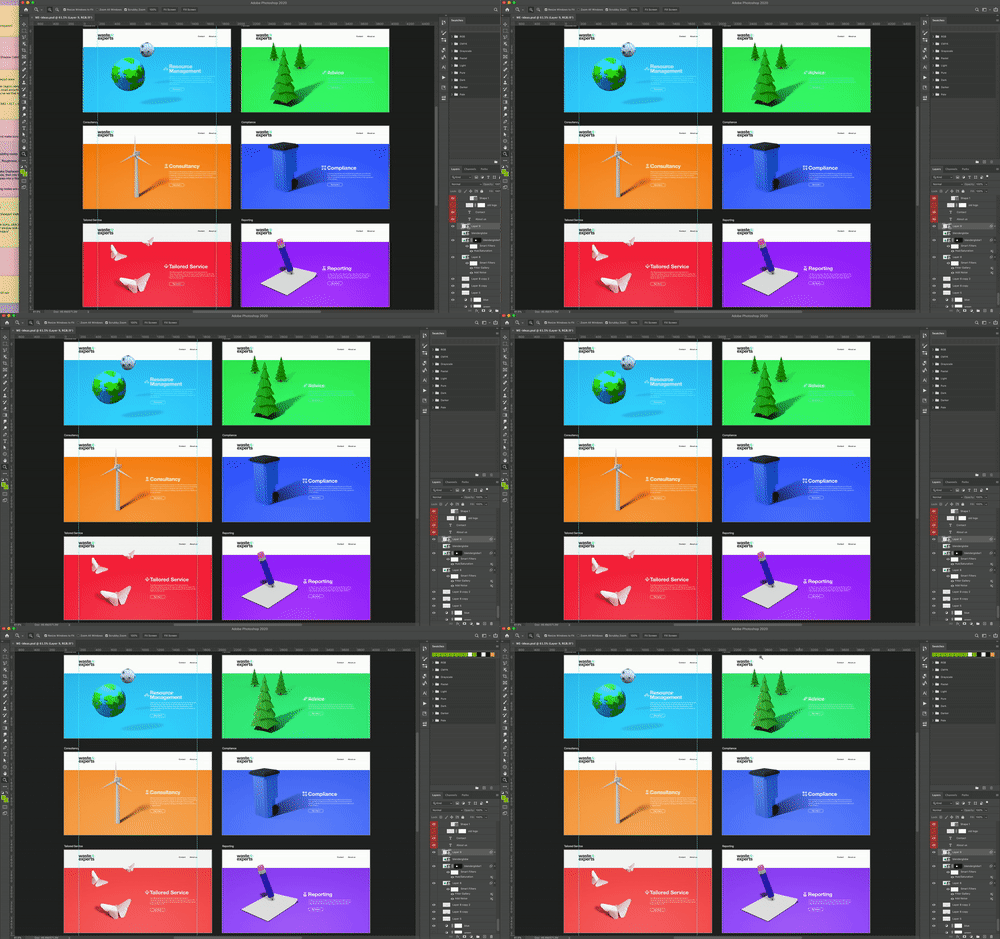
I've got the latest version of Photoshop as of 13 Dec 2019 - this has never happened before. 

This bug happens when dragging the photoshop window from my laptop to my monitor. Before you say it's my monitor settings, they haven't been changed and as you can see, the colours are bright until I let go of the window which means the monitor is capable of displaying accurate colors.

Anyone else experiencing this? Is this the latest update?

This topic has been closed for replies.

3 replies

D Fosse
Community Expert
Community Expert
December 16, 2019

I had almost forgotten about this issue - it comes up at quite irregular intervals. But in the past I have strongly advised people to report it in the feedback forum, and I still do. I couldn't do it myself since I didn't see it.


I have also said on several occasions that I believe it's a lot more widespread than what is reported. I say that because every single post I have seen about this, is from people with one wide gamut and one standard gamut display. Then it will obviously jump in your face as totally unacceptable.


But there's no reason to think it doesn't also happen with two standard, or two wide gamut units. Then the effect is likely so subtle that it's easily written off as insignificant - or even completely ignored.


So I decided to take a closer look myself. And there it was, this time in Bridge. All the other applications behave correctly. I haven't noticed because I have two wide gamut units that are close to identical. I had to put one in sRGB mode (with a corresponding monitor profile) to see it.


I'll take a closer look when I have time, all I had time for now was just registering the fact.

D Fosse
Community Expert
Community Expert
December 17, 2019

Update: Bridge does in fact switch to the correct monitor profile here, it's just slow to update and seems to require some action to do so - hitting spacebar for fullscreen display, switching between thumbnails, engaging the loupe etc. I have reconfirmed that Photoshop, ACR and Lightroom all behave correctly - the profile switch happens instantly when dropping.


Nevertheless, the bug is very real. The total number of reports over the years, with very precise descriptions, is quite high - and roughly 50/50 MacOS/Windows. But still mostly laptop + external display, very rarely workstation with two desktop displays.

NB, colourmanagement
Community Expert
Community Expert
December 16, 2019

Hi,


It can be tough to get Windows to properly use two screens and two display profiles, but it seems from your post that you've had this setup working well in the past.

well done.


What you are seeing is kinda the wrong way round, though.

NORMAL BEHAVIOUR:

When you are dragging between screens and still have hold of the image frame* with the cursor and the image is not yet fully onto the second screen then it’s still using the laptop screen profile.

So, the way this normally works is that the apearance is incorrect when dragging from your laptop whilst you are still holding the frame with your cursor*. 

When you let go the mouse button to drop the image* Photoshop (should) load(s) the profile for the "new" screen.


*(sometimes the profile switch occurs when the image frame gets "just so far" onto the second screen).


I think it’s likley a bug if it was definitely working fine before 


I suggest you try opening Photoshop's window (and the image) on the main screen (not the laptop) and see if it has the correct appearance. When you open Photoshop it will (should) look for the display profile for the screen it opens onto. 


If you want to be SURE about disoplay appearance then this is the kind of aid you'll need: http://www.colourmanagement.net/products/icc-profile-verification-kit


I hope this helps

if so, please "like" my reply

thanks

neil barstow, colourmanagement.net

[please do not use the reply button on a message in the thread, only use the one at the top of the page, to maintain chronological order]


D Fosse
Community Expert
Community Expert
December 16, 2019

"It can be tough to get Windows to properly use two screens and two display profiles"


I don't know where you heard that. Windows handles two screens and two profiles seamlessly without any issues. I have a dual display setup right in front of me. As you say, the second profile kicks in the moment you drop (not before). But the image frame has to be more than 50% across the midline.


So I agree with Johan - this is a bug, and it's not a new one either.  The wrong profile is used for one of the displays. It has been reported irregularly and occasionally for many years - for some reason, nearly always in a laptop + external display setup. It hits MacOS as much as Windows, so everything points to an Adobe bug.


It can also be application-specific - it happens with one Adobe application but not the others. IME it's usually ACR or Bridge, more rarely Lightroom or Photoshop. Again that points to an Adobe bug.


The only workaround I know of is to set it up so that the color-critical display is the primary one.

JohanElzenga
Community Expert
Community Expert
December 16, 2019

What most likely happens is that Photoshop is still using the monitor profile of the laptop. This could be a bug, so report it here: https://feedback.photoshop.com

-- Johan W. Elzenga