
Jordan Carter Art
Participant
May 17, 2025
Answered

Colour displays as faded in photoshop

  • May 17, 2025
  • 2 replies
  • 1186 views

Hello


I'm not sure why, but all my colours in photoshop are now displaying faded. I have reinstalled photoshop to see if it was a setting I had accidently changed. The colour settings are as I would expect (sRGB).

I don't believe it is my monitor as all colours in other software (After Effects, Premiere Pro etc) are displaying as I would expect. I have added an image here of how the same image is displaying in After effects Vs Photoshop


Is there anyone who has managed to fix this issue?! 


Thanks
Correct answer Ged_Traynor

Try changing it to sRGB colour space to see if it makes a difference, restart Photoshop if it's already opened

2 replies

Participant
October 3, 2025

it solved my probelm too late but if anyone else is also having problem with colors looking faded on photshop and only on photoshop just uninstall you monitor's driver 
yup belive it or not  but that solves the problem it did for me after i bought a new monitor (i know its dumb) and found that colors looked ok on defaulr driver (that detacts your monitor as "genaric pnp monitor") but as soon as i installed it orignal driver that shows its model colors started looking faded so

D Fosse
Community Expert
Community Expert
October 3, 2025

@faizan_4450 

It has nothing to do with the driver. Monitors are PnP (plug and play) devices that don't need a driver. All that gets installed is an .inf file that tells the system the model name - and a monitor profile. That's the problem. That's what the discussion above was about. These manufacturer monitor profiles are very often defective in various ways. It's a very common problem.


Removing this profile reverts the profile to the Windows default, which is sRGB IEC61966-2.1.


The proper fix is to use a calibrator to make a new custom profile. A monitor profile has one purpose: to be a description of the monitor's current and actual behavior, in detail. If the profile is incorrect, Photoshop cannot display correctly. A calibrator will make a profile based on actual measurement.

NB, colourmanagement
Community Expert
Community Expert
October 6, 2025

@faizan_4450 - @D Fosse has explained why you see what you see and also made a very good recommendation there, because no display screen actually matches sRGB fully - so, if you want proper accuracy then : The proper fix is to use a calibrator to make a new custom profile. A monitor profile has one purpose: to be a description of the monitor's current and actual behavior, in detail. If the profile is incorrect, Photoshop cannot display correctly. A calibrator will make a profile based on actual measurement.


I hope this helps

neil barstow colourmanagement - adobe forum volunteer,

colourmanagement consultant & co-author of 'getting colour right'

See my free articles on colourmanagement online


Ged_Traynor
Community Expert
Community Expert
May 17, 2025

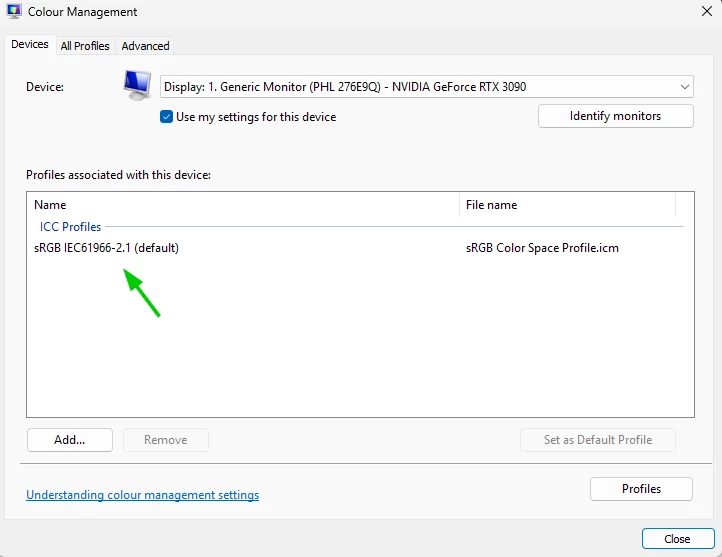
@Jordan Carter Art what colour profile does Windows colour management show

Jordan Carter Art
Participant
May 17, 2025

Hi @Ged_Traynor 


It's showing this.


I am a bit confused as to why it's only photoshop that is displaying incorrectly?


Thanks for the help!


Ged_Traynor
Community Expert
Ged_TraynorCommunity ExpertCorrect answer
Community Expert
May 17, 2025

Try changing it to sRGB colour space to see if it makes a difference, restart Photoshop if it's already opened