
Participant
May 4, 2018
Question

Colour replacement tool not changing colour.

  • May 4, 2018
  • 2 replies
  • 2006 views

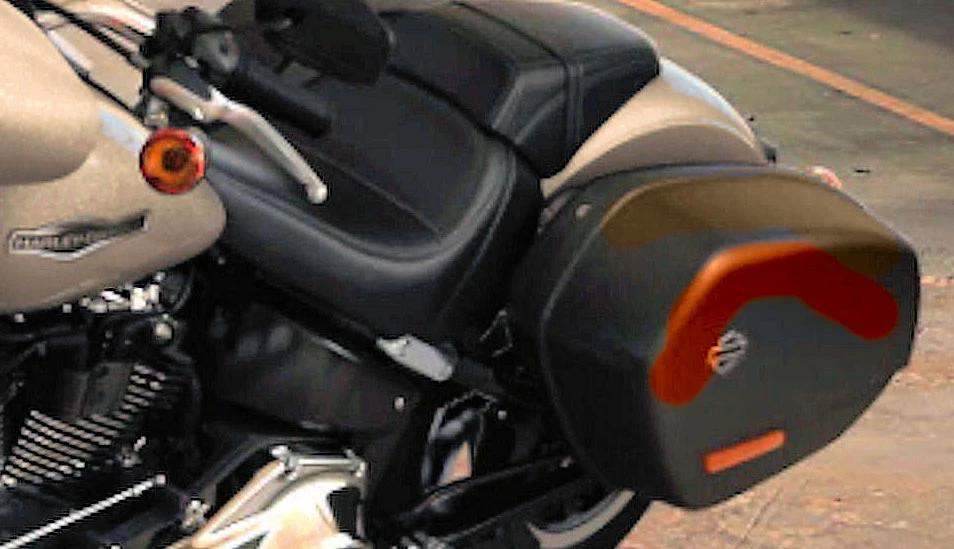
I am trying to change the colour on part of a photo in CS6. I am using the Colour Replacement tool. I want to change a black item on the photo to a lighter colour from another part of the photo. I used the Eye Dropper tool to sample the colour I want to use, swap to the Colour Replacement Tool and paint over the area. The colour changes to a rusty brown colour, whereas I have samples from a champagne colour. If I sample from a colour such as orange, then the colour brush will change the area to orange. I am working on a jpeg photo, in 8 bit mode, if that helps.

On the photo, the brown part at the top of the pannier was sampled from the petrol tank and the lower orange shade was sampled from the indicator lens.
    This topic has been closed for replies.

    2 replies

    c.pfaffenbichler
    Community Expert
    Community Expert
    May 4, 2018

    c.pfaffenbichler
    Community Expert
    Community Expert
    May 4, 2018
    I am using the Colour Replacement tool. I want to change a black item on the photo to a lighter colour from another part of the photo.

    In my opinion that Tool is worthless for serious work and the sooner you stop using it the better.

    Also you might be misunderstanding what it is supposed to do.

    What did you set the Tool to exactly in the Options Bar (Hue, Colour, Luminosity, …)?

    I recommend you start using Adjustment Layers instead of the Color Replacement Tool and adopt a more non-destructive approach to image editing.

    D Fosse
    Community Expert
    Community Expert
    May 4, 2018

    c.pfaffenbichler  wrote

    In my opinion that Tool is worthless for serious work and the sooner you stop using it the better.

    Amen.

    The relationship between color and tone is vastly more complicated than this crude tool can ever handle. Colors aren't just color, they also have an inherent brightness. Yellow is light, purple is dark. To look credible, changing a color also involves a full remapping of the tonal scale.

    People who are good at this will first select the area, and then use something like a gradient map adjustment layer. Because even if you're good at it, you will need to go back and readjust. Many times.

    roneccAuthor
    Participant
    May 4, 2018

    Hi c.pfaffenbichler.  I have to admit I am not very good with the intricate adjustments of photo editing. I did try adding an adjustment layer, but had no idea which to choose. I have used the tool a couple of times before, just for fun and the colour changed to what I was expecting, but not this time. I am a bit long in the tooth to absorb details that are confusing (to me anyway), so I look at the easy options. I think were it my job or a very important hobby, I would delve deeper, as I am sure some of the work on photos must feel very rewarding when they turn out how you want them. I will have a look at the photo you added and see whether I can get to that stage and have a play around. Thanks for your time replying.