Answered
Colour trouble
hey,
Normally the colour code ff6900 sets my photoshop to the orange I need to use for work.
When I type this code in today the colour is showing as red.
How do I change this back?
thanks 

hey,
Normally the colour code ff6900 sets my photoshop to the orange I need to use for work.
When I type this code in today the colour is showing as red.
How do I change this back?
thanks
Hi Jessica
There is no such colour as ff6900. It is just three numbers in Hexadecimal representing a value of Red, Green and Blue. To make it represent an actual colour it needs to reference a colour space such as sRGB, Adobe RGB, Prophoto etc. The same numbers can represent different colours in each colour space - similarly the same colour will be represented by different numbers in different colour spaces.
So the bottom line is - check the colour space of your previous documents and the colour space of your existing document (to do that just open them and set the info at the bottom of the document to show colour profile.
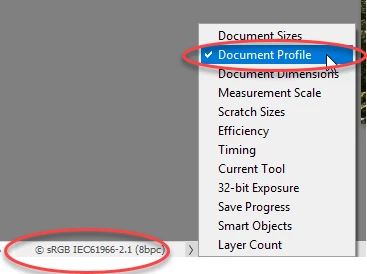
I suspect you will find that your previous current documents are using different profiles.
If they are the same - then you may have a different issue such as monitor profile - but don't change anything yet just check the document profiles
Dave
Already have an account? Login
Enter your E-mail address. We'll send you an e-mail with instructions to reset your password.
 AdChoices