Known Participant
September 14, 2020
Question

Composite Help (Newbie)

  • September 14, 2020
  • 2 replies
  • 452 views

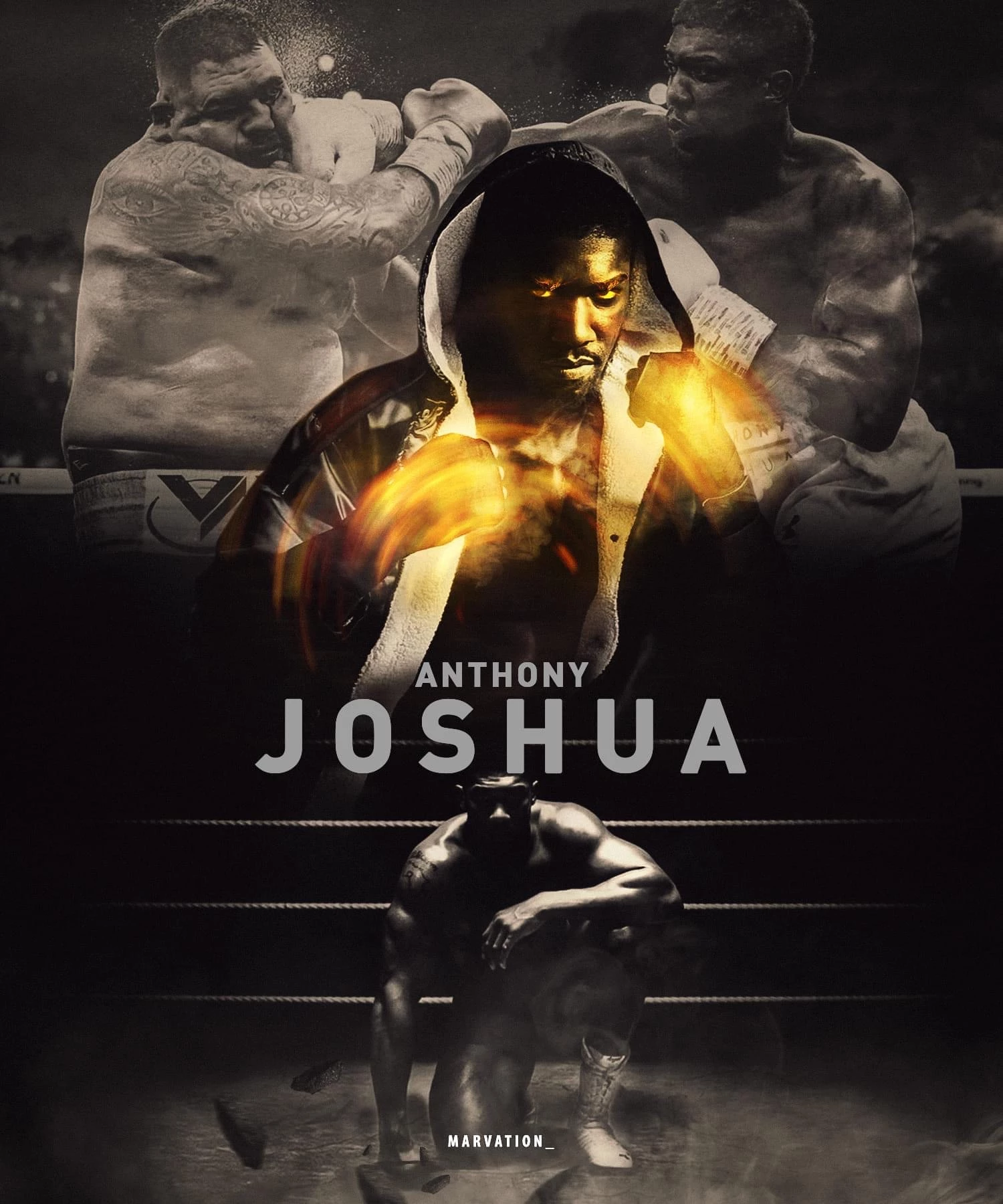
What are the steps to create the image in the top?

Faded or lower opacity image (The 2 boxers). Are there any video tutorials with steps to learn how to make subtle textured backgrounds? Sorry if my terminology is wrong. I'm 3 weeks into design and Adobe Software.


Thanks
 

This topic has been closed for replies.

2 replies

Leslie Moak Murray
Community Expert
Community Expert
September 23, 2020

As to the subtle textured background, the one in this particular image looks like it might be a sky placed over the fighters and set to "Overlay."  You would then play with the opacity slider until it looks the way you want it. For the spatter seeming to come from their mouths or faces, there are plenty of free spatter brushes for Photoshop, which you can find by googling.

Derek Cross
Community Expert
Community Expert
September 15, 2020

Have a look at the online video tutorials on Linkedin Learning -- you can get 30-days free access. https://www.linkedin.com/learning/photographing-for-compositing-in-photoshop/using-blend-modes-to-create-a-photorealistic-composite


Known Participant
September 22, 2020

Thank you Derek. I will do so.