
Participant
June 16, 2021
Question

Computer bluescreened while latest photoshop was open.

  • June 16, 2021
  • 2 replies
  • 550 views

Computer bluescreened while latest photoshop was open. Now I cant open the .PSD file I spent a lot of time working on. I've tried using repair PSD file programs but none of them work. When I try and open the .PSD file it gives me this error. 
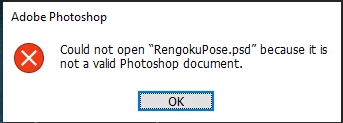
Does anyone know how I can get back my .PSD?

I attached the .PSD here

https://drive.google.com/file/d/1EUfBl5k1mWjWhIwi3O4yika2xqgfN10Q/view?usp=sharing


    This topic has been closed for replies.

    2 replies

    War Unicorn
    Community Expert
    Community Expert
    June 16, 2021

    I can't open it either.  😞


    Blue screens are never good when it comes to open documents. Corruption is very likely.


    I can't stress this enough: If you're working on something mission-critical, make sure you have copy of a copy. That way, if one document goes kablooey, you have another.

    Participant
    June 16, 2021

    Alright. Well at least I have screenshots of it (it was a rough draft of a drawing) so it isn't too bad but still very annoying. I'm definitely going to make backups from now on. Typically photoshop does it for me but not this time.

    TheDigitalDog
    Inspiring
    June 16, 2021

    That PSD is no good on this end, either in Photoshop or other products like GraphicConverter. Seems utterly corrupted or worse:

    Author “Color Management for Photographers" & "Photoshop CC Color Management/pluralsight"