
Answered
Configure mixer brush tool
I have seen on the forum and have not found anything about it
I would like to configure the mixer brush tool with a script 
I wish I could set all these parameters
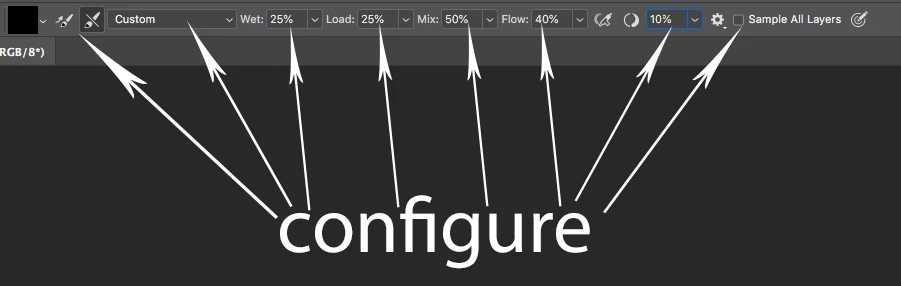
I hope it can be done since I use this tool a lot

I have seen on the forum and have not found anything about it
I would like to configure the mixer brush tool with a script
I wish I could set all these parameters
I hope it can be done since I use this tool a lot
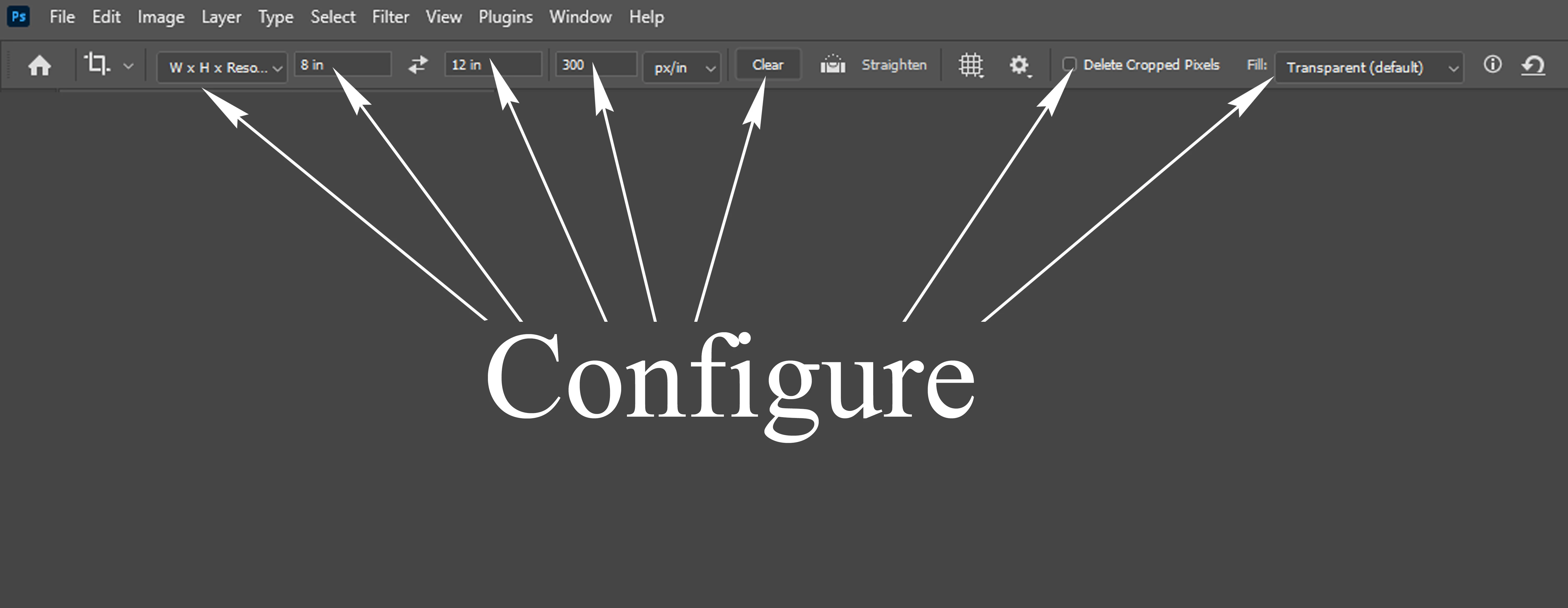
I would like to configure the Crop tool with a script.
I wish I could set all these parameters. . . Thank You Sir @c.pfaffenbichler
var options = new ActionDescriptor();
var options2 = new ActionDescriptor();

options2.putEnumerated(stringIDToTypeID("cropAspectRatioModeClass"), stringIDToTypeID("cropAspectRatioModeClass"), stringIDToTypeID("pureAspectRatio")); //targetSize, originalProportions, etc...
options2.putDouble(stringIDToTypeID("aspectWidth"),  0);
options2.putDouble(stringIDToTypeID("aspectHeight"), 0);
options2.putDouble(charIDToTypeID("CrWV"),  0);
options2.putDouble(charIDToTypeID("CrHV"),  0);
options2.putInteger(charIDToTypeID("CrWS"), 0);
options2.putInteger(charIDToTypeID("CrHS"), 0);
options2.putInteger(charIDToTypeID("CrRV"), 0);
options2.putInteger(charIDToTypeID("CrRS"), 1);
options2.putInteger(stringIDToTypeID("cropOverlay"), 2);
options2.putInteger(stringIDToTypeID("CropOptionsShowOverlay"), 1);
options2.putInteger(stringIDToTypeID("orientation"), 0);

options2.putInteger(stringIDToTypeID("cropShieldColorMode"), 1);

var c = new ActionDescriptor();
c.putDouble(stringIDToTypeID("red"),  200);
c.putDouble(stringIDToTypeID("green"),  0);
c.putDouble(stringIDToTypeID("blue"),   0);
options2.putObject(stringIDToTypeID("cropColor"), stringIDToTypeID("RGBColor"), c);

options2.putInteger(stringIDToTypeID("cropOpacity"), 75);

options2.putBoolean(stringIDToTypeID("cropAutoLightenShield"), true);
options2.putBoolean(stringIDToTypeID("cropShowShield"), true);
options2.putBoolean(stringIDToTypeID("preview"), false);
options2.putBoolean(stringIDToTypeID("cropAutoCenterCropBox"), true);
options2.putBoolean(stringIDToTypeID("cropShowCroppedArea"), true);
options2.putBoolean(stringIDToTypeID("AutoFillOnCrop"), true);
options2.putBoolean(stringIDToTypeID("hides"), false);

options.putObject(charIDToTypeID("CrpO"), charIDToTypeID("CrOC"), options2);

var r = new ActionReference();
r.putClass(stringIDToTypeID("cropTool"));

var d = new ActionDescriptor();
d.putReference(stringIDToTypeID("null"), r);
d.putObject(stringIDToTypeID("to"), stringIDToTypeID("null"), options);

executeAction(stringIDToTypeID("set"), d, DialogModes.NO);Already have an account? Login
Enter your E-mail address. We'll send you an e-mail with instructions to reset your password.
 AdChoices