
Inspiring
June 24, 2017
Answered

Confused With Info Panel
  • June 24, 2017
  • 2 replies
  • 4095 views

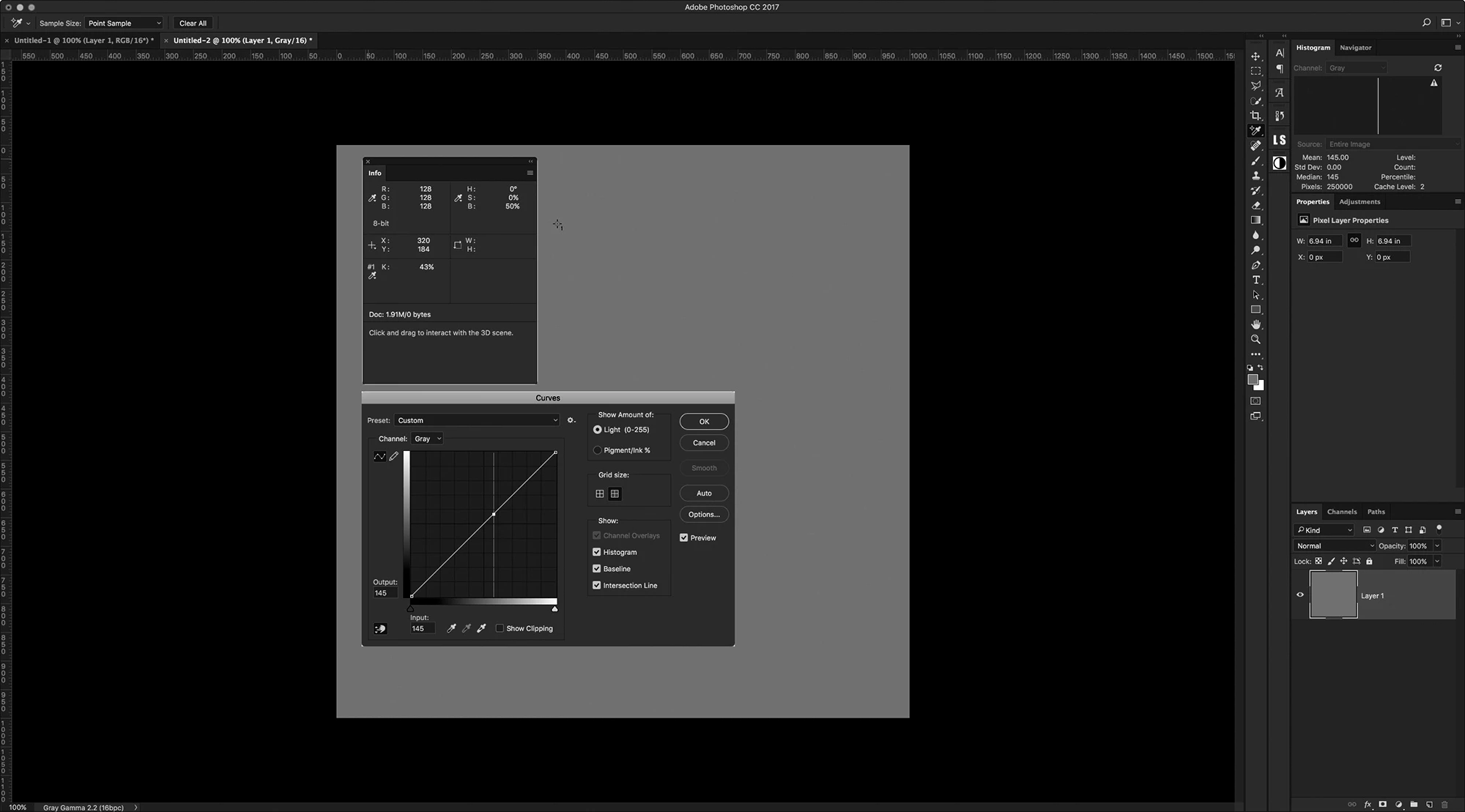
I created a new Document in Gray Gamma 2.2

I filled the layer with RGB 128,128,128

Placing a target point on the gray layer, the Info Panel Reports

RGB 128,128,128

K: 43%

HSB: 0,0,50%

Plotting the point with a Curve, the Input value reads 145

Can anyone explain why the K: value is not 50% and why the Curve Input in not 128

Ian

This topic has been closed for replies.
Correct answer D Fosse

Numerical values across color modes relate to your working spaces.

If you use gray gamma 2.2, you also need to set RGB values in a color space that actually uses gamma 2.2 - the only one is Adobe RGB. ProPhoto corresponds to gamma 1.8, and sRGB to sGray.

The dot gain grays have no RGB equivalent. They're supposed to compensate for ink spreading when it hits paper.

There is in fact no particular reason these numbers should match. They're not supposed to. If they do, it's mostly by accident.

2 replies

D Fosse
Community Expert
D FosseCommunity ExpertCorrect answer
Community Expert
June 25, 2017

Numerical values across color modes relate to your working spaces.

If you use gray gamma 2.2, you also need to set RGB values in a color space that actually uses gamma 2.2 - the only one is Adobe RGB. ProPhoto corresponds to gamma 1.8, and sRGB to sGray.

The dot gain grays have no RGB equivalent. They're supposed to compensate for ink spreading when it hits paper.

There is in fact no particular reason these numbers should match. They're not supposed to. If they do, it's mostly by accident.

davescm
Community Expert
Community Expert
June 25, 2017

Hi Dag

You are absolutely right (as I would expect from you on a colour issue ). I've changed the correct answer to yours.

The fact that I was using Adobe RGB as my color working space - caused the values I looked at to match .

However, I wonder why it has been implemented this way. Whilst of course the K value at 50% brightness, or "RGB" number   will change according to the particular gray profile, it makes no real sense to have different values for the same pixel reported in the info panel , the histogram , the color picker and the curves dialogue.

I would have thought that on switching to a grayscale document profile - all the panels should switch to that common reference, including the color picker which should really only allow picking from gray when in grayscale mode.

Dave

D Fosse
Community Expert
Community Expert
June 25, 2017

Right. I actually thought that was the way it did work - that any open document should override the working space for that color mode. But I haven't checked this, and if not I agree with you.

davescm
Community Expert
Community Expert
June 24, 2017

Hi Ian

I can't see what is going wrong in that screenshot. Here I've used the same settings as you are using - but with different (and as expected) results

Dave

IanBarberAuthor
Inspiring
June 24, 2017

davescm​ hmm...  Your screenshot is what I was expecting to see.

I am going to do this again just to make sure I never overlooked something

IanBarberAuthor
Inspiring
June 24, 2017

Still getting the same. I am mystified as to what could be causing this