
Participating Frequently
October 12, 2019
Answered

Confusion about Adjustment clipping

  • October 12, 2019
  • 6 replies
  • 723 views

Hi,


I was wondering why the appearance changes when I clip this adjusment: 
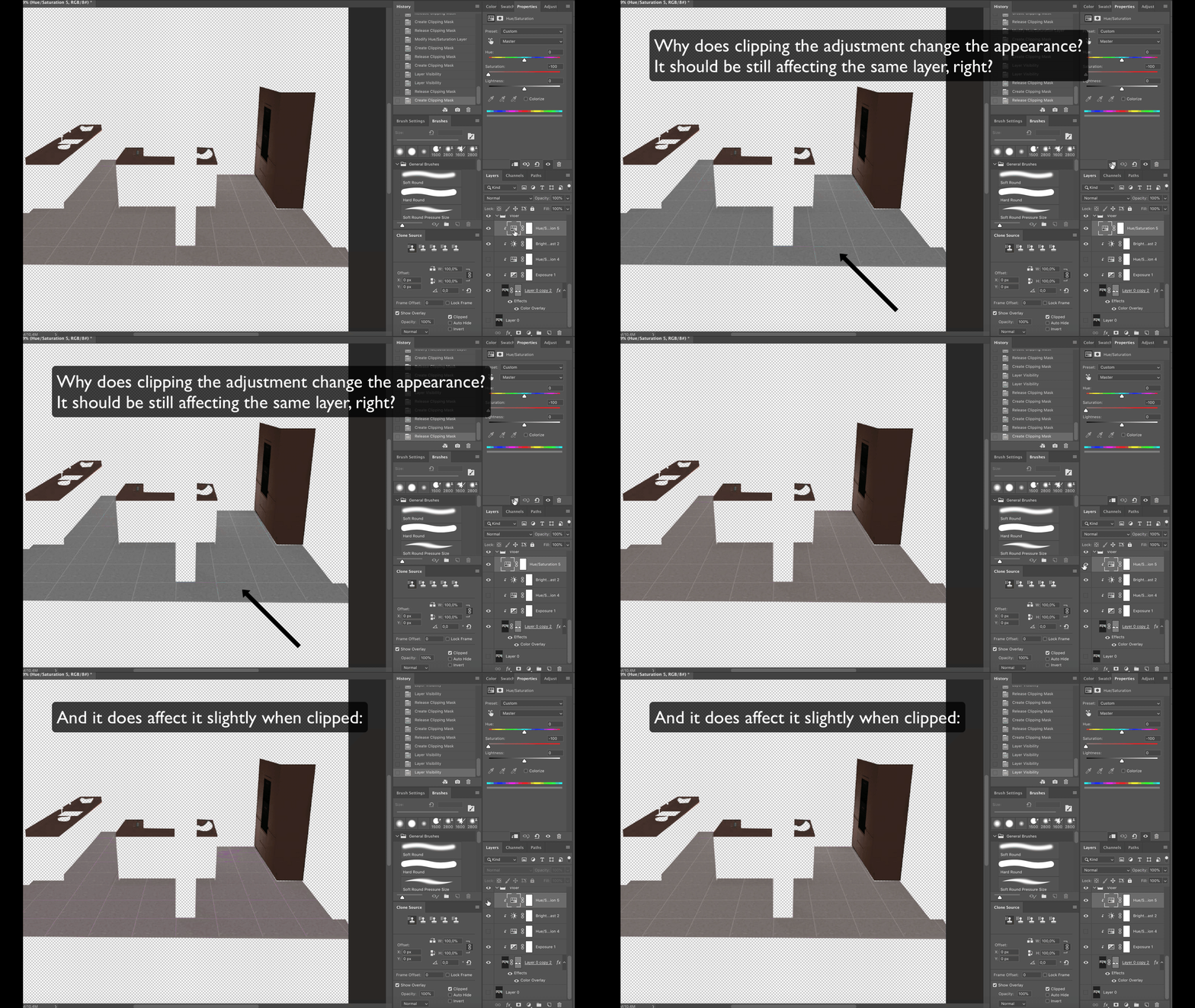
There is only one layer beneath it, which it should affect. Shouldn't it just stay the same, whether it is clipped or not?

Also: it does affect it when clipped (only a little bit, and also differently).


Hope someone can clarify this.


Thanks in advance. 🙂 


Edit: here is the file:


This topic has been closed for replies.
Correct answer Chuck Uebele

Okay, I think I got it now. What is happening is that the clipping mask only affects the layer it's clipped to, not the layer effects on that layer. So the color overlay overrides your adjustment layer to remove the saturation.

6 replies

Participant
October 13, 2019

This is a very frustrating problem. Did it work out? I met a similar one but could not solve it. (Sorry for my english!)

Takarítás

Chuck Uebele
Community Expert
Community Expert
October 13, 2019
This is expected behavior for layer effects. There are actually benefits for having it work this way.
Chuck Uebele
Community Expert
Chuck UebeleCommunity ExpertCorrect answer
Community Expert
October 12, 2019

Okay, I think I got it now. What is happening is that the clipping mask only affects the layer it's clipped to, not the layer effects on that layer. So the color overlay overrides your adjustment layer to remove the saturation.

Participating Frequently
October 12, 2019

That's true, Chuck. Thanks.
I fixed it by placing that layer inside a group and clip the adjustments to that group.

Chuck Uebele
Community Expert
Community Expert
October 12, 2019
Yep that would work.
Chuck Uebele
Community Expert
Community Expert
October 12, 2019

Okay, I looked at you psd file. that top layer is only clipped to the cabinet on the right, not the floor and everything else. So when you unclip it, it modifies the floor, when it's clipped, it modifies only the cabinet.

Participating Frequently
October 12, 2019

Sorry for forgetting to mention: It is that orange labeled adjustment layer that I unclip in the GIF. The cabinet on the right is not affected by that adjustment layer, only the floor.

Chuck Uebele
Community Expert
Community Expert
October 12, 2019

Do you have "Use Legacy Compositing" turned on in the preferences under performance?

Participating Frequently
October 12, 2019
Hm, thats weird. No I haven't.
Chuck Uebele
Community Expert
Community Expert
October 12, 2019

It was hard to see on my phone, so, yea, in your case the top layer should have the same effect whether it's clipped or not.

Chuck Uebele
Community Expert
Community Expert
October 12, 2019

The clipping layer will affect the layer at the bottom of the clipping stack, not just the one right below it, if it too is clipped.

Participating Frequently
October 12, 2019
You mean: it only affect image layers (not other adjustment layers)? Then the appearance should still stay the same right? There is only one image layer visible underneath this adjustment.